
 By Yilu Support
You want to find out which proxy is best for SEO. The answer depends on what you want to do. Proxies help you get past problems like IP blocks. They also help stop unfair search results. This makes proxies important for getting good data and better results. The best proxies for SEO let you check rankings. They also help you study competitors from anywhere. Yilu Proxy is a trusted proxy company. You can try their free trial. You can test both residential and datacenter proxies. This helps you pick the best proxies for SEO for your needs.
Key Takeaways
Residential proxies use real home IPs. They give high privacy and low block rates. This makes them great for local SEO. They are also good for tasks that need geo-targeting.
Datacenter proxies come from servers. They are very fast and cost less money. They work well for big SEO jobs. They are also good for scraping lots of data.
Use residential proxies to avoid blocks. They help you get correct local search results. Use datacenter proxies for speed. They are good for cheap, big tasks.
Try proxies with a free trial, like Yilu Proxy gives. This helps you find the best one for your SEO needs. It also helps you not make common mistakes.
Do not use free proxies. Always match your proxy type to your SEO goals. This will help you get better results. It will also keep your campaigns working well.
What Are Residential Proxies?
Definition
You might ask what residential proxies are and why they help with SEO. Residential proxies use real IP addresses from people’s homes. These IPs come from internet service providers. When you use them, your traffic looks like it comes from a real person. This makes websites trust your requests more. Most websites do not block these IPs because they seem normal.
Residential proxies hide your real IP address. They let you look like you are in different places. This helps when you want to scrape data or check search results. You can also see content only shown in some countries. With a residential proxy network, you can use many IPs. This makes it hard for websites to block you.
Note: Residential proxies are harder for websites to spot and block. They mix in with normal users. This means you can collect data or scrape with less chance of being blocked.
How They Work
Residential proxies send your internet traffic through real home devices. These devices have IPs from ISPs. Every request you make looks like it comes from a real home user. Rotating residential proxies change your IP often. This helps you avoid being noticed and keeps scraping smooth.
There are different kinds of residential proxies. Rotating ones change your IP with each request or after some time. This makes it harder for websites to find patterns. Some proxies keep the same IP longer. This helps if you need to stay logged in. You can pick shared or dedicated residential proxies for your needs.
Residential proxies are slower than datacenter proxies. They use real home internet, so they are not as fast. But they give you better privacy and get blocked less. You can use them for scraping, ad checks, and seeing content from other places. The rotation feature is important for big scraping jobs and staying hidden.
What Are Datacenter Proxies?
Definition
Datacenter proxies use IP addresses from servers in a datacenter. These IPs are not from real homes or ISPs. Companies buy these IPs from hosting providers. When you use a datacenter proxy, your real IP is hidden. Your online actions look like they come from a datacenter, not your house or work.
Experts say datacenter proxies act as go-betweens. They send your requests through special servers in a datacenter. This keeps your location and who you are private from websites. Datacenter proxies are very fast and let you visit many sites quickly. People use them for scraping, SEO checks, and testing websites. These proxies are not tied to real people, so websites can sometimes spot them. They check records and see the IP is from a datacenter.
Tip: Datacenter proxies are liked because they are fast and cheap. You can get lots of IPs for big jobs.
How They Work
Datacenter proxies run on real or virtual servers in a datacenter. When you make a request, the proxy server sends it to the website. The website only sees the datacenter IP, not yours. This keeps your real identity secret and helps you avoid blocks.
You can use datacenter proxies for big jobs. They are good for scraping lots of data. They connect straight to the internet, so they are fast and steady. Many people pick datacenter proxies for bulk SEO checks or tasks done by bots.
Here is how it works:
You connect to a datacenter proxy server.
The proxy server sends your request to the website.
The website answers the datacenter IP.
The proxy server gives the answer back to you.
Datacenter proxies are simple to set up. You can buy many at once and use proxy software to manage them. This makes them great for projects that need lots of IPs. But websites can sometimes tell if you use datacenter proxies. They might block or mark these IPs because they know they are from a datacenter. This happens more with strict websites or ones that want to stop bots.
A quick comparison:
Feature | Datacenter Proxies | Residential Proxies |
|---|---|---|
IP Source | Datacenter servers | Real home users |
Speed | Very fast | Slower |
Cost | Lower | Higher |
Block Risk | Higher | Lower |
Best Use | Bulk scraping, automation | Geo-targeted tasks |
Pick datacenter proxies if you want speed and low cost for SEO or scraping. They are best for easy jobs that do not need to hide who you are.
Best Proxies for SEO: Key Differences

Speed
Speed is a big difference when picking proxies for SEO. Datacenter proxies are very fast. They use strong servers in datacenters. This means you get quick responses and lots of bandwidth. Datacenter proxies work well for big SEO jobs and scraping lots of data. They are about 5 to 10 times faster than residential proxies. For example, datacenter proxies can answer in just 0.09 seconds. Residential proxies usually take about 0.6 seconds. Residential proxies use home internet, so they are slower and can change speed. If you need to get lots of data quickly, datacenter proxies are better.
Tip: Always check how fast a proxy is before buying. Slow proxies can mess up your SEO work and cause problems.
Proxy Type | Average Response Time (seconds) | Bandwidth | Notes |
|---|---|---|---|
Residential Proxies | 0.52 – 0.6 | Limited | High success rate, slower, more stable |
Datacenter Proxies | 0.09 | High/Unlimited | Very fast, best for bulk tasks |
Cost
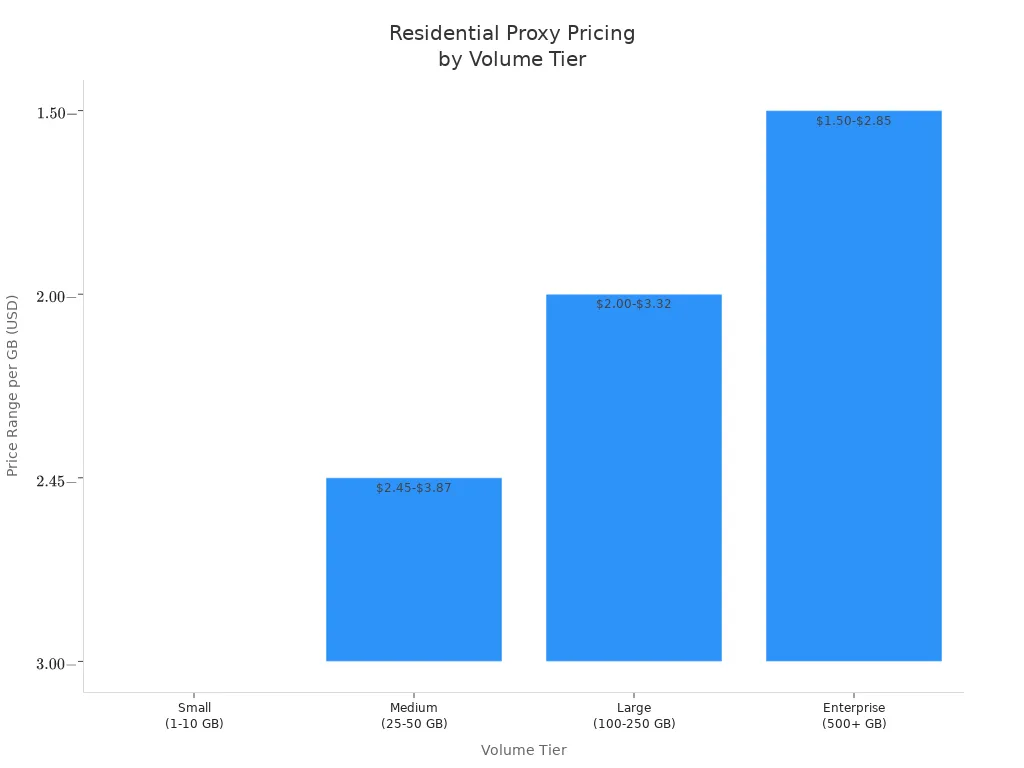
Cost is another big difference. Datacenter proxies cost less money. You can get many datacenter proxies for a low price, sometimes just $4.50 for each IP every month. This is good for big SEO projects with small budgets. Residential proxies cost more because they use real home IPs. They also give you more privacy and safety. Residential proxies can cost $3.00 to $4.00 for each GB if you buy a small plan. Even if you buy a lot, they still cost more than datacenter proxies. If you use 100-300 GB each month, you might pay $800 to $2,500 for residential proxies.
Note: Datacenter proxies are best if you want to save money on big, simple SEO jobs.
Anonymity
Anonymity is very important for SEO. Residential proxies give you the most privacy. They use real home IPs, so websites think you are a normal user. This makes it hard for websites to block you. Datacenter proxies use IPs from datacenters. Websites can spot these IPs and block them more often. If you want to stay hidden and not get banned, pick residential proxies.
Aspect | Residential Proxies | Datacenter Proxies |
|---|---|---|
Origin | Real home IPs, tied to real locations | Datacenter IPs, not tied to real users |
Detection & Anonymity | Hard to detect, high anonymity and security | Easier to detect, lower anonymity |
Use Cases | Stealth tasks, web scraping, geo-restrictions | Speed, cost, bulk tasks |
Block Rate
Block rate is also important. Residential proxies are not blocked much. They act like real users, so websites do not block them often. They work well for SEO scraping, with over 90% success. Datacenter proxies get blocked more, with only 40% to 60% success. Websites often see datacenter proxies as bots. If you want a low block rate, use residential proxies.
Proxy Type | Success Rate | Block Rate Implication |
|---|---|---|
Residential Proxies | Over 90% | Low block rate |
Datacenter Proxies | 40-60% | Higher block rate |
Geotargeting
Geo-targeting helps with local SEO and checking ranks. Residential proxies are best if you want to see search results from different places. They use real IPs from real cities or countries. This gives you true local data. You can check how your website ranks in many places. Datacenter proxies do not have real locations. They cannot always show local content or get past geo-blocks.
Note: Residential proxies let you search from many cities and countries. You get real local search results.
Reliability
Reliability is needed for SEO work. Datacenter proxies are very steady and have strong connections. They use datacenter servers, so you get long, stable sessions. This is good for big SEO jobs that run all the time. Residential proxies can lose connection if the home device goes offline or the IP changes. Their bandwidth is also limited by home internet. Still, residential proxies are good for staying hidden and reliable for secret tasks.
Metric | Residential Proxies | Datacenter Proxies |
|---|---|---|
Speed | Medium to unstable | High, stable |
Stability | Occasional interruptions | High stability |
Bandwidth | Limited | High, supports bulk operations |
Session Persistence | Limited | Strong |
Connection Stability | Medium | High |
Scalability
Scalability means how easy it is to handle more work. Datacenter proxies can handle lots of SEO requests at once. They are fast and steady, so you can process lots of data quickly. This makes them great for big SEO jobs. Residential proxies can also scale, but it costs more and is harder. You need many IPs and smart rotation to not get caught. Some providers give unlimited residential proxies with special rotation. This helps you scale and stay private.
Tip: For big SEO jobs, use datacenter proxies for speed and saving money. Use residential proxies if you need to hide, target locations, and avoid getting blocked.
Comparison Table
Feature Overview
You want to know how residential proxies and datacenter proxies compare. The table below puts their main features next to each other. This makes it easier to pick the right one for your SEO work.
Feature | Residential Proxies | Datacenter Proxies |
|---|---|---|
IP Address Source | Real devices on home internet networks | Data center servers or cloud-based infrastructure |
Cost | More expensive | Typically cheaper |
Pricing Structure | Priced per gigabytes of network traffic | Priced per number of IPs or per gigabytes (shared proxies) |
Speed | Slower due to home network bandwidth | Faster with dedicated hardware and business-grade network |
Scraping Ability | Effective for scraping restricted websites with strong anti-bot systems | Suitable for scraping simple targets on a large scale |
IP Pool Size | Large pools with millions of IPs | Smaller pools, thousands to millions |
IP Range & Variance | Dynamic, extensive range with high variance | Fixed, limited range with minimal variance |
Application | Geo-targeting, ad verification, SEO monitoring, bypassing anti-bot systems | SEO monitoring, price monitoring, testing, scraping non-demanding sites |
Reliability | Can overcome complex anti-bot systems | Prone to CAPTCHAs and IP bans |
Anonymity | Better anonymity due to ISP-assigned IPs | Less anonymous, IPs traceable to data centers |
Connection Stability | Less stable, depends on home network | More stable with dedicated resources |
Geographic Diversity | Offers diverse geographic locations | Limited geographic locations |
Bandwidth | Limited, varies by home network | Higher bandwidth, often unlimited |
Tip: Think about bandwidth before you choose. Residential proxies have less bandwidth because they use home internet. Datacenter proxies give you more bandwidth, so you can handle bigger SEO jobs.
Residential proxies help you stay private and target certain places. You can pick cities or ZIP codes. The bandwidth is lower, so you must watch how much you use.
Datacenter proxies are quicker and cost less money. They give you more bandwidth and steady connections. These proxies are good for big jobs, but websites can spot them more easily.
A table like this shows what each proxy type is good at. You can look at cost, speed, bandwidth, and reliability to pick the best one for your SEO work.
SEO Use Cases
Web Scraping
Web scraping is used a lot in SEO. Residential proxies are best for scraping sites with strong anti-bot rules. They use real IPs, so your traffic looks normal. This helps you get more data and avoid blocks. Some smart proxies can change your IP and skip CAPTCHAs. These tools help you scrape without stopping. Datacenter proxies are fast and have lots of bandwidth. They are good for scraping easy sites or when you need to get lots of data fast. If you want to scrape content from other places, use residential proxies.
Tip: For big scraping jobs or hard sites, use residential proxies with smart rotation.
Rank Tracking
Rank tracking means checking your website’s keyword ranks. Residential proxies work well and have high success rates, over 99%. They act like real users and show you true search results from any place. You can get past geo-blocks and CAPTCHAs with them. Datacenter proxies are cheaper and faster, but search engines spot them more. This can cause more blocks and less good data. For the best rank tracking, pick residential proxies.
Local SEO
Local SEO needs you to see search results from certain cities or areas. Residential proxies send your traffic through real devices in those places. This gives you real local data and helps you get past geo-blocks. You do not get as many CAPTCHAs and can see content only shown in some places. Datacenter proxies do not give you the same location accuracy. For local SEO, residential proxies are better for scraping and getting good data.
Bulk Data
If you need lots of data, datacenter proxies are great. They are fast and have high bandwidth, so you can scrape a lot at once. You can send thousands of requests quickly. But if a site has strong anti-bot rules, residential proxies help you not get banned. For most big data jobs, start with datacenter proxies for speed. If you get blocked, switch to residential proxies.
Social Media
Social media sites often block datacenter proxies. Residential proxies work better for scraping and bots on these sites. They use real IPs, so your actions look normal. This helps you get content from other places and not get banned. For social media scraping, residential proxies are best and keep your accounts safe.
Competitor Analysis
Competitor analysis lets you see what others are doing. Residential proxies link each IP to a real device and place. This helps you get past blocks and collect data from many regions. You can use rotating or sticky IPs to stay hidden. Datacenter proxies get blocked more, so residential proxies are better for getting good data and scraping.
Choosing the Right Proxy
Selection Tips
You want to pick the best proxy for your SEO work. Start by thinking about your main goal. If you need speed and want to scrape lots of data, datacenter proxies work well. If you need to look like a real user or target a specific city, residential proxies are better. Use the table below to help you decide:
Criteria | Datacenter Proxies | Residential Proxies |
|---|---|---|
Detection Risk | High | Medium |
Speed & Scalability | Fast, very scalable | Good speed, less scalable |
Location Targeting | Country-level | City or ZIP code level |
IP Authenticity | Low | High |
Cost | Low | High |
Many people make mistakes when choosing a proxy service provider. Here are some things to avoid:
Using free proxies. These are slow, unreliable, and often blocked.
Picking the wrong proxy type for your task. This can lead to bans or poor results.
Using the same IP for many accounts. This triggers blocks.
Ignoring the need for sticky sessions. This breaks logins and causes errors.
Not rotating browser headers or user-agents. This makes you easier to spot.
Choosing a proxy service provider with poor support or limited IP diversity.
Tip: Always match your proxy type to your SEO task. For local SEO, use residential proxies. For bulk scraping, datacenter proxies are best.
Yilu Proxy Free Trial
You want to test before you buy. Yilu Proxy gives you a free trial so you can check speed, reliability, and coverage. This helps you see if the proxy service provider fits your needs. Yilu Proxy offers SOCKS5 proxies that work with many SEO tools. You get access to a large IP pool and high success rates. The free trial lets you try both residential and datacenter proxies without risk. You can see how well they hide your IP and bypass geo-blocks. Yilu Proxy also gives strong customer support and smart management tools. This makes it easy to run your SEO campaigns smoothly.
Note: Testing with a free trial helps you avoid common mistakes and find the best proxy for your project.
There are big differences between residential and datacenter proxies for SEO. Residential proxies keep you private and help you not get blocked. Datacenter proxies are fast and cost less for big jobs.
Proxy Type | Strengths | Weaknesses |
|---|---|---|
Residential Proxies | High anonymity, geo-targeting | Slower, more expensive |
Datacenter Proxies | Fast, scalable, cost-effective | Easier to detect, blocked |
You should test both types with Yilu Proxy’s free trial. Trying them helps you pick the best one for your SEO work. Choosing well can help your SEO get better results.
FAQ
What is the main difference between residential and datacenter proxies?
Residential proxies use real home IP addresses. These come from people’s houses. Datacenter proxies use IPs from special servers. You get more privacy with residential proxies. Datacenter proxies are faster and cost less money.
Can you use both proxy types for SEO tasks?
Yes, you can use both types for SEO. Use residential proxies when you need privacy or want to target a place. Datacenter proxies are good for fast jobs with lots of data. Try both types to see which one works best for you.
Why do websites block datacenter proxies more often?
Websites can tell datacenter IPs come from servers. Many bots use these IPs for scraping. Sites block them to stop fake visits. Residential proxies look like normal users, so they are blocked less.
How do you choose the right proxy for local SEO?
Pick residential proxies for local SEO work. They use real IPs from cities or areas. This lets you see real local search results. Datacenter proxies cannot show you true local results.