
 By Yilu Support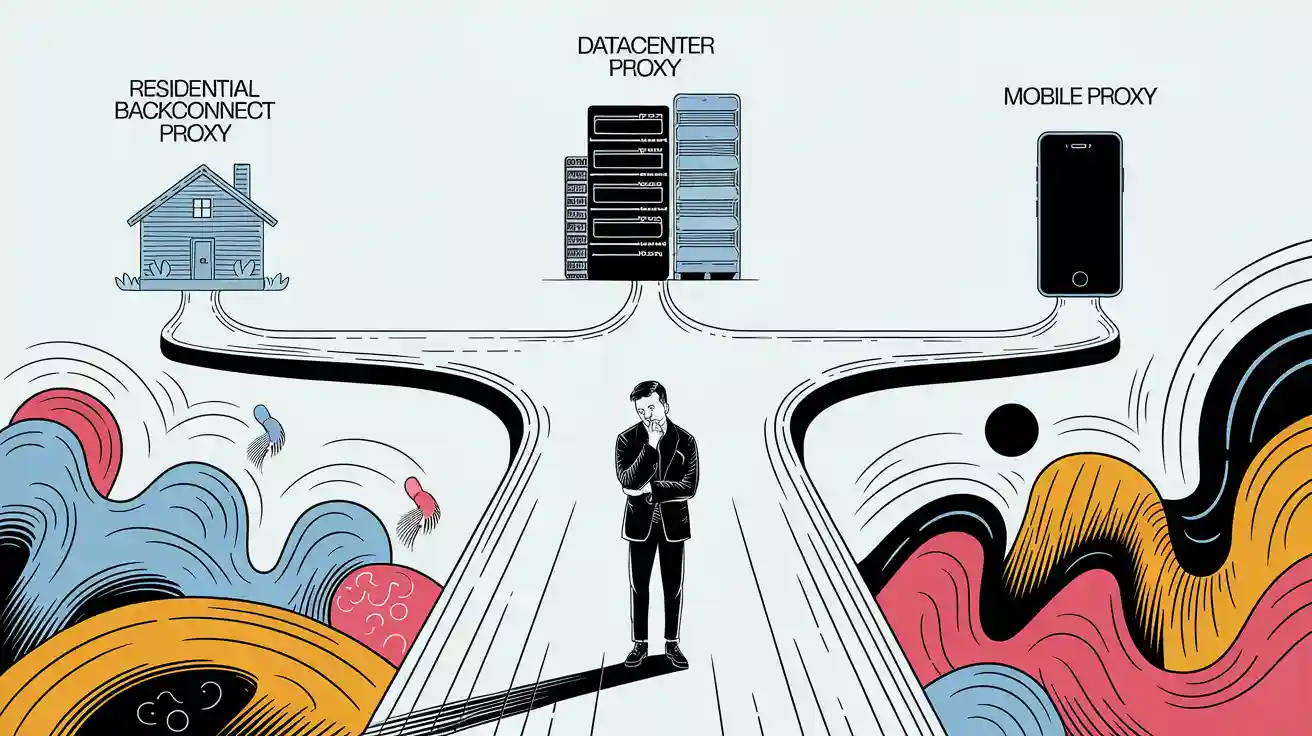
You need to pick the right proxy for your needs. A residential backconnect proxy helps you stay hidden and safe. It is suitable for scraping or privacy jobs. Datacenter proxies are fast and cheap. They work well for web scraping or seo monitoring. These jobs do not need high secrecy. Mobile proxies are best for testing mobile apps. They also help you overcome difficult location blocks. Look at the table below to see which proxy fits your job:
Proxy Type | Common Use Cases |
|---|---|
Datacenter Proxies | web scraping, SEO monitoring, competitor research, price comparison, ad verification, load testing, accessing geo-restricted content, server management, anonymous browsing |
Residential Proxies | web scraping, sneaker copping, applications needing higher anonymity and lower detection risk |
Mobile Proxies | Mobile app testing, social media automation, bypassing location-based restrictions |
Pick the proxy that matches your scraping or privacy goals. Try the FREE TRIAL of Yilu Proxy to see which one works best for you.
Key Takeaways
Datacenter proxies are very fast and cheap. They are suitable for big scraping jobs and automation. Use them when privacy is not a major concern.
Residential backconnect proxies utilize genuine home IPs that frequently change. They give more privacy and work better for secret scraping. They also help you avoid getting blocked.
Mobile proxies utilize real mobile device IP addresses. They are trusted the most and can get past hard geo-blocks. However, they are more expensive and slower.
Select a proxy that suits your needs. If you want speed and a low price, choose a data center. If you want privacy and to hide, pick residential. If you need to bypass hard blocks or test mobile devices, consider using mobile proxies.
Yilu Proxy offers a wide range of high-quality residential and data center proxies. They provide excellent assistance and offer a wide range of options. This helps you find the best proxy for your needs.
Quick Comparison
Proxy Types
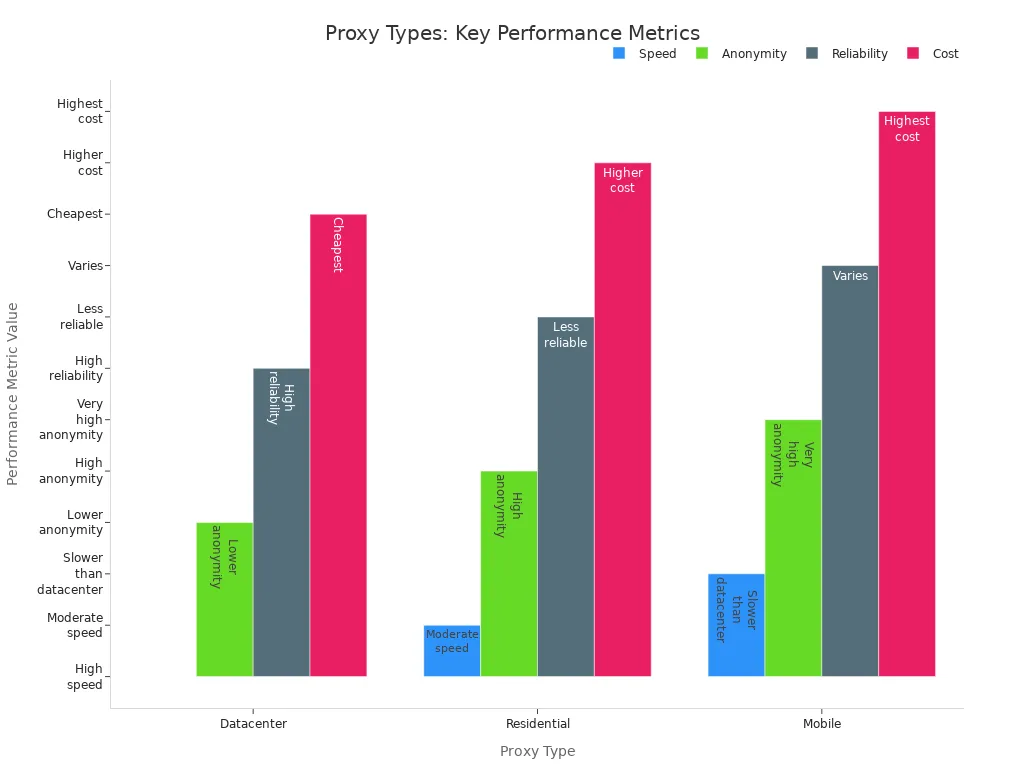
There are three main proxy types to choose from. These are datacenter proxies, residential backconnect proxies, and mobile proxies. Each one is good for different jobs. The table below compares their performance in terms of speed, anonymity, reliability, and cost.
Proxy Type | Speed | Anonymity | Reliability | Cost | Best For |
|---|---|---|---|---|---|
Datacenter Proxies | Very fast (avg. <0.3s) | Low | Very high (99.99%) | Lowest (~$1.39/IP) | Fast scraping, seo monitoring, price checks |
Residential Backconnect | Moderate (~0.5s) | High | Medium (rotating) | Higher ($1.75/GB) | Stealth scraping, privacy, geo-targeting |
Slower | Very high | Varies | Highest ($117/mo) | Mobile app testing, strict anti-bot bypass |
Key Differences
Datacenter proxies are the fastest and cheapest. They are suitable for web scraping or seo monitoring. You do not get much secrecy with them. They are well-suited for large-scale data processing jobs. But websites can block them easily.
Residential backconnect proxies utilize genuine home IP addresses. These IPs change frequently, so you appear to be a normal user. You get more privacy and can avoid blocks. They are ideal for scraping sensitive sites or when you need to remain undetected.
Mobile proxies utilize real mobile device IP addresses. They give you the most trust and can bypass tough anti-bot systems. Use them for mobile app testing or when other proxies are not working. They are the most expensive and the slowest.
Tip: For web scraping, rotating residential backconnect proxies are the most effective. If you want speed and low price, datacenter proxies are a good pick. For mobile jobs, mobile proxies are the best choice.
Select the proxy that best suits your job. Datacenter proxies are ideal for fast and easy scraping. Residential backconnect proxies help you stay private and avoid blocks. Mobile proxies are best for mobile app testing or hard geo-blocks.
Residential Backconnect Proxy
What Is It?
A residential backconnect proxy is a residential proxy. It uses IP addresses from real homes and devices. When you use this proxy, your web traffic appears to originate from a genuine IP address. This makes your requests seem real to websites. These proxies help you avoid blocks and bans. They do not resemble data center traffic.
Residential backconnect proxies utilize IP addresses from actual residential homes.
They work through a gateway that changes these IPs from a big group.
This setup enables the system to change IP addresses, select locations, and manage sessions.
You do not have to change proxies yourself. The system does it for you.
How It Works
When you connect to a residential backconnect proxy, your requests are routed through a proxy gateway first. The gateway sends your request through a real residential IP. This uses a rotating IP system. Each time you connect, you might get a new IP address. This makes it hard for websites to track or block you. The large pool of residential proxies ensures that you rarely use the same IP address twice. This keeps your activity private and helps you stay hidden.
Pros and Cons
Advantages | Disadvantages |
|---|---|
High success rate and uptime | Some plans have limited bandwidth |
Geo-targeting with a large IP pool | Setup can be hard for beginners |
Easy to use with many tools | Sometimes slower than datacenter proxies |
Rotating and sticky sessions for privacy | Costs more than datacenter proxies |
Note: Residential proxies give you high privacy and secrecy. They use real devices, so websites trust them more than datacenter proxies.
Best Uses
You should use a residential backconnect proxy when you need to stay hidden and need reliable service. These proxies are best for:
Big market research and checking prices
Collecting data for SEO and ad checks
Running many accounts without getting banned
Getting into geo-restricted content
Jobs that need high privacy and lots of IP changes
Residential proxies are ideal when you want to avoid IP bans and maintain anonymity. The rotating IP system and real residential IPs make them perfect for sensitive scraping and privacy jobs.
Datacenter Proxies
What Is It?
Datacenter proxies give you IP addresses from data centers. These IPs do not originate from a home internet connection. They come from cloud companies and business networks. When you use them, your real IP is hidden. Websites only see the data center’s IP address. This makes your traffic appear different from that of home users. Datacenter proxies use IP addresses that are easily identifiable by websites. Sometimes, websites block these IPs. These proxies are fast and stable because they use strong servers.
How It Works
You connect to a datacenter proxy server. The server sends your request to the website. It uses its IP address, not yours. Your real IP stays hidden. Datacenter proxies do not change IPs by themselves. You get one IP until you switch it. This setup is ideal for jobs that require speed and stable connections. Datacenter proxies have fewer IPs and locations than residential or mobile proxies. They focus on speed and stable service, not on hiding as a regular user.
Here is a quick comparison:
Feature | Residential Proxies | Datacenter Proxies |
|---|---|---|
IP Source | Home devices (ISP) | Data centers/cloud providers |
Speed | Slower | Faster |
Detection Risk | Low | High |
Cost | Higher | Lower |
Geo Coverage | Wide | Limited |
Pros and Cons
Pros | Cons |
|---|---|
Very fast speeds for high-speed data scraping | Easier for websites to detect and block |
Low cost per IP | Lower anonymity than residential proxies |
High uptime and stable connections | Limited geo-locations |
Easy to set up and scale | Not ideal for stealth or sensitive tasks |
Unlimited bandwidth in most cases | Risk of IP bans and CAPTCHAs |
Tip: Datacenter proxies are best when you need speed. They are not good for hiding from strict websites.
Best Uses
Use data center proxies for jobs that require speed and large amounts of data. They are great for:
Big web scraping projects
SEO monitoring and keyword checks
Handling many social media accounts
Checking ads and tracking prices
Automated testing and server work
Datacenter proxies help you finish fast data scraping and automation jobs. They are ineffective in bypassing sophisticated anti-bot systems. They also do not work well for geo-restricted content. If you want the fastest and most cost-effective tool for big data jobs, choose datacenter proxies.
Mobile Proxies
What Is It?
Mobile proxies send your internet traffic through real mobile devices. These devices utilize cellular networks, including 3G, 4G/LTE, and 5G. When you use a mobile proxy, it appears as if you are using a phone or tablet. The IP addresses originate from mobile carriers and are subject to frequent changes. This makes your online activity look real to websites. Websites trust these IPs because they are constantly changing. You can use mobile proxies to see content made for mobile users. They also help you get around blocks that stop other proxies.
How It Works
When you use a mobile proxy, your request goes to a mobile device first. This device is on a cellular network. The proxy sends your request to the website using the device’s IP. As the device moves or reconnects, the IP address changes. This makes it hard for websites to track or block you. You can also use devices from different places. This allows you to view content from multiple locations. You can bypass geo-blocks and appear as a local mobile user.
Mobile proxies are trusted because they utilize genuine mobile IP addresses. The IPs change frequently and behave like real mobile traffic. Social media and websites trust this traffic. You get fewer bans or blocks.
Pros and Cons
Here is a table that shows the main good and bad things about mobile proxies:
Benefits | Drawbacks |
|---|---|
Use real mobile IPs for high trust and privacy | Cost more than datacenter or residential proxies |
Changing IPs make tracking and blocking harder | Slower speeds because of shared mobile data |
See mobile-only content and location-based services | |
Collect data with fewer blocks | |
Check ads and apps in different places and carriers |
Best Uses
Pick mobile proxies when you need the most trust and access. They are best for:
Testing mobile apps and websites
Automating social media without getting blocked
Getting past tough geo-blocks or anti-bot systems
Collecting search results seen by real mobile users
Checking ads and prices for mobile traffic
Mobile proxies are more expensive, but they work when others do not. If you need to appear like a genuine mobile user and remain anonymous, opt for mobile proxies.
Residential Proxies vs Others

Speed
You want your proxy to be fast. Datacenter proxies are the quickest. They utilize powerful servers and experience almost no lag. Residential proxies are not as fast. They use real home IPs, so you may experience a slight wait. Mobile proxies are the slowest. They use mobile networks, which can be less steady and slower than the others.
Proxy Type | Speed/Performance |
|---|---|
Datacenter proxies | Very fast; high uptime |
Moderate speed; reliable | |
Mobile proxies | Lower speed; slower data transfer |
Anonymity
If you want to stay hidden, look at how each proxy keeps you safe. Residential proxies give you good privacy. They use real home IP addresses and change them frequently. This makes it hard for websites to follow you. Datacenter proxies do not provide as much anonymity. Their IPs are not from homes so that websites can spot and block them. Mobile proxies are the hardest to find. They use real mobile device IPs, so websites rarely catch them.
Proxy Type | Anonymity Characteristics | Detection Likelihood |
|---|---|---|
Residential proxies | High; frequent IP rotation; hard to track | Low |
Datacenter proxies | Lower; no ISP link; easy to detect | High |
Mobile proxies | Superior; real mobile IPs; very hard to detect | Very low |
Elite proxies hide your real IP and also hide that you use a proxy. Residential proxies and mobile proxies can do this well.
Reliability
You want your proxy to work consistently. Datacenter proxies are very steady and almost always online. They utilize robust servers, so they rarely experience downtime. Residential proxies can go offline sometimes. They depend on real people’s devices, which may disconnect at any time. But websites trust them more, so they get blocked less. Datacenter proxies get blocked more often. Mobile proxies can be reliable, but their speed and uptime depend on the quality of the mobile network.
Residential proxies: Get blocked the least, but uptime changes if devices go offline.
Datacenter proxies: Stay online for a long time, but get blocked and found more often.
Mobile proxies: Hard to detect, but speed and uptime depend on the network.
Pricing
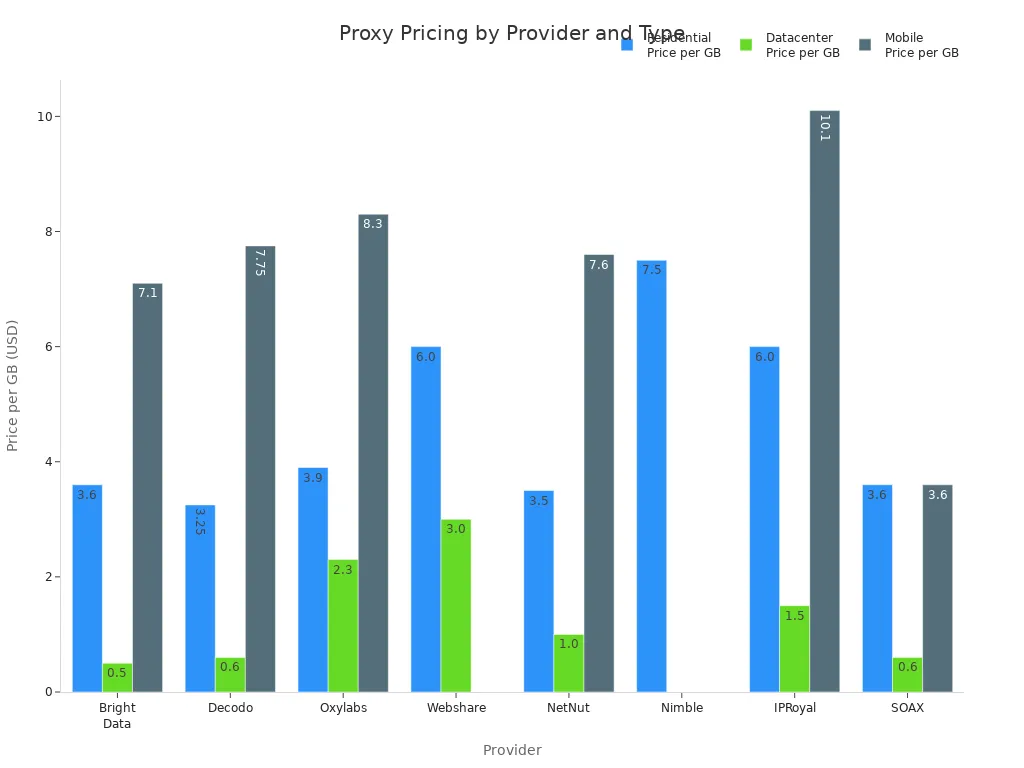
You need to think about how much you want to spend. Datacenter proxies cost the least. You can get them for $ 0.50 to $ 3.00 per GB. Residential proxies cost more, typically ranging from $3.0 to $7.8 per GB. Mobile proxies are the most expensive. They cost $7.1 to $10.1 per GB. Prices change if you want more features, different places, or use more data.
Proxy Type | Average Price Range (per GB) |
|---|---|
Datacenter proxies | $0.5 – $3.0 |
Residential proxies | $3.0 – $7.8 |
Mobile proxies | $7.1 – $10.1 |
Tip: If you want good privacy and trust, pick residential proxies. If you want speed and a low price, datacenter proxies are best. For the most stealth, choose mobile proxies.
Choosing the Right Proxy
Match to Needs
You need to pick the best proxy for your job. First, think about what you want to do. If you wish to fast speed and low price, datacenter proxies are a good choice. These proxies help you finish big web scraping jobs quickly. They also work well for seo monitoring and automation when websites do not block you much.
If you want to stay private or avoid bans, residential proxies are a better option. These proxies utilize genuine home IP addresses, which enables websites to trust them more. Use residential proxies for scraping sensitive sites or accessing geo-restricted content. They are also suitable for managing multiple accounts, conducting market research, and performing ad checks.
Mobile proxies give you the most trust. Use them if you need to look like a real mobile user. They help you bypass strong anti-bot systems and access geo-blocked content. Mobile proxies are more expensive, so save them for special jobs.
Tip: Always choose your proxy based on your risk tolerance, budget, and the website you want to visit. For speed, datacenter proxies are best. For privacy, use residential proxies. For the most demanding tasks, opt for mobile proxies.
Common Scenarios
The table below shows how each proxy type fits different jobs:
Proxy Type | Common Scenarios Where It Excels | Strengths | Limitations |
|---|---|---|---|
Datacenter | High-volume web scraping, automation tasks needing speed | High speed, low cost, easy to scale | Detected by strict anti-proxy systems |
Residential | E-commerce data checks, social media, geo-restricted content | Real home IPs, trusted by websites | Costs more, not as easy to scale |
Mobile | Stealth tasks, social media, bypassing geo-blocks | Most trusted, hard to block | Too costly for big scraping jobs |
Use data center proxies for scraping large websites or running SEO tools. These proxies help you collect a large amount of data quickly. Residential proxies are suitable for e-commerce price checks, social media, and accessing geo-restricted sites. They allow you to avoid bans and make you appear like a real user. Mobile proxies are ideal for managing social media or bypassing the toughest blocks. They help you see mobile-only content and avoid being caught.
Some companies utilize cloud proxies to manage traffic and ensure smooth operation. For example, Dropbox utilizes proxies to distribute traffic evenly. Reddit uses them to deliver content quickly. You can use proxies for various purposes, but always select one that suits your specific needs.
Why Yilu Proxy
You want a proxy provider with numerous options and reliable service. Yilu Proxy is a good pick for many reasons:
You have access to over 90 million dynamic residential and data center proxies worldwide. This enormous pool helps you find the correct IP for any job.
Yilu Proxy works with SOCKS5 and HTTP protocols. You can use these proxies on Windows, macOS, Android, iPhone, and iPad.
The service has static residential proxies from real home networks. These IPs remain the same, providing you with high privacy. You can use one IP for an extended period, which helps with security and reduces the risk of bans.
Yilu Proxy removes malicious IPs to maintain high quality. You get fast speeds and steady connections.
You can make unlimited requests and use as much data as you want. This helps with big web scraping or seo jobs.
The prices are fair, and you get help online if you need it.
Yilu Proxy is suitable for social media, e-commerce, ad verification, and marketing purposes. Try a free trial to see if it works for you.
Note: Yilu Proxy provides a wide range of residential and data center proxies. You can use them for scraping, getting into geo-restricted sites, or running automation tools. The service helps you stay safe, fast, and steady.
You now know the key differences between proxy types. Datacenter proxies give you speed for bulk tasks. Residential proxies help you stay private and access local content. Mobile proxies are most effective for bypassing tough blocks and mobile testing.
Decide why you need a proxy, such as for privacy or speed.
Check for strong privacy features and ensure there is no data logging.
Select a provider with excellent support and positive reviews.
Match your choice to your budget and needs.
Try Yilu Proxy’s free trial to see which option fits your goals.
FAQ
Is using a proxy legal?
You can use proxies legally in most countries. You should always follow local laws and website rules. Never use proxies for illegal activities.
Will a proxy keep my data safe?
A proxy hides your real IP address. It does not always protect your data. You should use secure websites (HTTPS) and choose trusted proxy providers for better safety.
How do I set up a proxy?
You can set up a proxy by entering the proxy details in your browser or app settings. Most providers give you step-by-step guides. You do not need special skills.
Which proxy type should I choose for web scraping?
Datacenter proxies work best for speed.
Residential proxies help you avoid blocks.
Mobile proxies are best for tough sites. Pick the one that matches your needs and budget.