
 By Yilu Support
You might wonder, what is a rotating proxy? It’s a tool that allows you to go online using a new IP address each time you connect. When you use rotating proxies, your IP address changes frequently, making it significantly harder for others to track your online activity and thereby protecting your privacy. Many users choose from rotating residential proxies, mobile proxies, or datacenter proxies, each offering unique advantages. For instance, rotating residential proxies and mobile proxies make your online presence appear more authentic, like that of a real person. Over 39% of Americans use a proxy or VPN to enhance privacy and access content. Check out the table below to see how rotating proxies support various industries:
Industry / Sector | Practical Applications |
|---|---|
Financial Analysis | Track prices, monitor stocks, bypass restrictions. |
Academic Research | Collect social media data, observe trends, avoid slowdowns. |
Cybersecurity | Test applications, rotate IP addresses, evaluate firewalls. |
Product Development | Test features across locations, verify app performance. |
Retail & E-commerce | Detect price changes, gather data, prevent blocks. |
Choosing the right provider is crucial. Yilu Proxy Free Trial offers you the chance to experience rotating proxies for free and without any risk.
Key Takeaways
Rotating proxies frequently change your IP address. This helps keep your privacy safe and stops online blocks.
There are three main types. These include residential, data center, and mobile proxies. Each type has different speed, price, and trust levels.
Rotating proxies work by frequently changing IP addresses. They also manage sessions to maintain a steady or flexible connection.
They assist with tasks such as web scraping and ad verification. They also help you run many social media accounts safely.
Rotating proxies give strong privacy and fewer blocks. However, they can be more expensive and sometimes cause your connection to be slower.
What Is a Rotating Proxy
If you ask, “What is a rotating proxy?” you want to know how it keeps you hidden online. A rotating proxy assigns you a new IP address each time you connect or periodically. This makes it challenging for websites to track your activity. People use rotating proxies for tasks such as web scraping, ad verification, and social media management. These proxies frequently change your IP address, allowing you to avoid bans and blocks.
Rotating Proxy vs Static Proxy
You may wonder how a rotating proxy is different from a static proxy. The primary difference lies in how each one handles your IP address and maintains your privacy. A static proxy uses a single IP address throughout the entire session. This is beneficial if you need to appear the same online, such as when checking email or browsing a website. However, using the same IP address can make it easier for others to track or block you.
A rotating proxy automatically changes your IP address. This is called proxy rotation. It can occur after every request or after a certain amount of time. When your IP address changes frequently, it is difficult for websites to associate your actions. This helps you stay hidden and avoid detection.
Here’s a table to help you see the differences:
Feature | Static Proxies | Rotating Proxies |
|---|---|---|
IP Address Management | One IP address that stays the same for your session | Changes IP addresses each request or after some time from a big IP pool |
Anonymity | Good privacy but can get flagged for using one IP | Better privacy by changing IPs, so tracking is hard |
Pros | Keeps session going, easy to whitelist, same location | Fewer blocks, high privacy, many IPs to use |
Cons | One IP can get blocked, needs manual changes | Sessions can break, harder to whitelist, may slow down during changes |
Use Cases | Good for email, watching websites, needs steady session | Great for scraping, price checks, ad checking, needs to be sneaky |
Pricing | Usually cheaper, pay for each IP | Costs more, pay for data or bandwidth |
Speed | Very fast, low delay | Fast but can slow down when changing IPs |
Tip: If you want to avoid bans and need strong privacy, use rotating proxies. If you need a steady connection, a static proxy server is better.
Types of Rotating Proxies
When you learn about what a rotating proxy is, you find that there are different types. Each type is suitable for specific tasks. The three main types are rotating residential proxies, datacenter proxies, and mobile proxies.
Rotating Residential Proxies: These utilize IP addresses from actual residential homes. Internet companies give these addresses to real people. When you use rotating residential proxies, websites think you are a regular user. This means you are less likely to get blocked. These proxies are suitable for web scraping, SEO checks, and bypassing location blocks. They offer strong privacy but come at a higher cost and are not always the fastest.
Datacenter Rotating Proxies: These come from data centers or cloud services. They are swift and easy to use for big jobs. Datacenter proxies cost less than other types. However, websites can sometimes detect and block them because they do not appear to be genuine users. You can use them for large tasks, price checks, and collecting a lot of data.
Mobile Proxies: Mobile proxies use IP addresses from phone companies. When you use mobile proxies, websites see you as a real phone user. This gives you the most trust and privacy. Mobile proxies are great for social media, ad checking, and testing phone apps. They cost more and can be slower, but they are very hard to block.
Here’s a table to help you compare the types:
Characteristic | Residential Rotating Proxies | Datacenter Rotating Proxies | Mobile Proxies |
|---|---|---|---|
IP Source | Real home users from internet companies | IPs from data centers and cloud services | IPs from phone companies |
Speed & Performance | Medium to high, depends on the internet company | Very fast, low delay | Medium speed, can be slow sometimes |
Cost | Costs more because of real home IPs | Cheaper | Costs more because of mobile IPs |
Scalability | Grows okay | Grows very well | Grows less |
Anonymity | High, looks like real users | Medium, easier to spot and block | Very high, trusted by most sites |
Use Cases | Scraping, location blocks, SEO checks | Data collecting, making many accounts, price checks | Social media, ad checking |
IP Blocking Risks | Low, but can happen if used too much | High, easy to spot | Very low, trusted by websites |
Geolocation Accuracy | High, uses real home IPs | Can change, uses mixed IPs | High, matches phone networks |
Note: When choosing between rotating residential proxies, data center proxies, and mobile proxies, consider your budget, speed, and privacy requirements. Mobile proxies offer the highest level of trust and are less likely to get blocked, but they are more expensive. Rotating residential proxies provide a good balance of price and realism. Datacenter proxies are fast and inexpensive, but they are also easier for websites to detect.
Now you know what a rotating proxy is, how it is different from static proxies, and the main types you can use. This helps you choose the right one for your online work, like scraping with rotating residential proxies or managing social media with mobile proxies.
How Do Rotating Proxies Work
If you know how rotating proxies work, you can see why they help with privacy and data collection. The main idea is proxy rotation and session management. These two things hide what you do online. They also make it hard for websites to block you.
IP Rotation
IP rotation means your IP address changes often. This can occur after a set period or after you perform an online action. When you use rotating proxies, your IP address changes frequently. The system switches your IP address in different ways. This makes it look like many people are using the internet.
Here are some ways proxy rotation works:
Pre-configured IP rotation: The system automatically changes your IP address at specified intervals.
Specific IP rotation: You pick which IP address you want to use.
Random IP rotation: The system gives you a random IP address each time.
Burst IP rotation: Your IP address changes after a specified number of connections, typically every 10 requests.
Proxy rotator tools: These tools automatically change your IP address, often using random or burst methods.
Time-based rotation: The system periodically switches your IP address, typically every 5, 10, or 30 minutes.
Request-based rotation: Your IP address changes after a set number of requests, which helps with big data jobs.
Intelligent rotation: Some systems employ innovative techniques to determine when to change your IP address, based on how websites behave.
Tip: Using different proxy rotation ways helps you avoid bans and makes your browsing look normal.
When you use rotating proxies, IP rotation hides your location. It also makes it difficult for websites to track your activity. For example, if you collect data from a website, each request can use a new IP address. This makes it almost impossible for the website to block you by your IP. Proxy rotation also helps you get past rate limits and CAPTCHAs. These often prevent users who send too many requests from a single IP address.
Session Management
Session management works in conjunction with proxy rotation to maintain a steady connection or switch it when needed. You can pick rotating sessions or sticky sessions, depending on your job.
Session Type | Description | How It Prevents Detection and Blocking | Best Use Cases |
|---|---|---|---|
Rotating Sessions | Changes your IP address often, either per request or at set intervals. | Makes it hard for websites to track or block you, simulating many different users. | Web scraping, ad verification |
Sticky Sessions | Keeps the same IP address for a set time, locking it for your session. | Looks like normal user behavior, so you avoid login challenges and security checks. | Social media, account management |
Session management uses session IDs and life settings. When you start a session, the system gives you a special session ID. If you keep the same session ID, you will have a sticky session and retain the same IP address. If you change the session ID, the system gives you a new IP address and starts a new session. The life setting indicates how long your IP address remains active before it changes again.
Rotating proxies can change your IP address for every request, allowing websites to avoid identifying patterns.
Session management allows you to maintain the same IP address when you require a stable connection, such as logging into an account.
By combining proxy rotation and session management, you can appear as multiple users or maintain a consistent presence, depending on your needs.
Innovative rotation plans and session controls help you avoid anti-bot systems and IP bans.
Note: Always match your session management style to your job. Use rotating sessions for collecting data and sticky sessions for account work.
How do rotating proxies work? They utilize both IP rotation and session management to maintain your online privacy and simplify your online experience. You can choose how often your IP address changes and how long you keep a session. This helps you avoid getting caught, overcome obstacles, and complete your tasks without issues.
Rotating Proxies Use Cases

Web Scraping
Sometimes, you need to retrieve a large amount of data from websites. This can be used for research, business, or price checking. Using rotating proxies makes web scraping easier and more reliable. These proxies change your IP address every time you send a request. This helps you avoid getting banned and keeps your data collection going. Many websites block users if they use the same IP address too frequently. Rotating residential proxies and mobile proxies help you appear to be many users. This makes it hard for websites to notice your scraping.
Rotating proxies also help you get around geo-restrictions. You can select IPs from various locations, such as other countries or cities. This allows you to view content that is not available in your area. Some proxy services perform IP changes and session management on your behalf. This means you don’t have to fix blocked connections as often. You can focus on collecting a large amount of data. Yilu Proxy gives you rotating residential proxies and mobile proxies for web scraping. This provides you with strong protection and enables you to work more efficiently. You can try their free trial to see how it works.
Ad Verification
If you work with ads, you need to verify that they display correctly in various locations. Ad verification involves viewing ads from multiple locations, simulating the experience of a real user. Rotating proxies, such as mobile proxies and rotating residential proxies, help you achieve this. They give you new IP addresses for each check. This enables you to avoid bans, CAPTCHAs, and limits that websites use to stop repeated checks.
You can check ads in your area and find fraud early.
Rotating proxies let you test ads from many countries, cities, or ISPs.
You enjoy good uptime and can review ads in real-time.
Industry / User Type | Use Case Description |
|---|---|
Businesses conducting ad verification | Use rotating residential proxies to check ad spots and stop fraud. |
Advertisers | Make sure ads show up right in different places. |
Yilu Proxy has mobile proxies and rotating residential proxies for ad verification. You can use their free trial to test ads and make your campaigns better.
Social Media Management
Running many social media accounts can be risky. Sites like Instagram and X.com monitor IP addresses and block accounts that appear suspicious. Rotating proxies, especially mobile proxies, help you run many accounts safely. Each account gets its IP address. This enables you to avoid bans and keeps your accounts safe.
Assign each account a dedicated proxy for enhanced security.
Utilize mobile proxies to make your accounts appear authentic.
Change your IP address frequently to avoid detection and maintain smooth operation.
Rotating proxies also help you post, like, and follow without getting blocked. You can share content across all accounts and maintain a consistent brand message. Yilu Proxy assists with social media management by utilizing mobile proxies and rotating residential proxies. Try their free trial to see how you can manage accounts without worry.
Note: Rotating proxies provide the security you need for web scraping, ad verification, and social media management. Yilu Proxy supports all these uses and offers a free trial, allowing you to experience the benefits firsthand.
Pros and Cons of Rotating Proxies
Benefits
Rotating proxies offer numerous benefits for both work and personal use. Here are some of the main benefits:
Your IP address changes frequently, making it difficult for others to track you or identify you.
You are less likely to get banned because your requests use multiple IP addresses, allowing you to continue working.
You can do big jobs like web scraping, ad checking, and app testing without much trouble.
You can access content from other countries by using IP addresses from those locations.
You can collect data easily, even if websites try to stop you with limits or bans.
You can bypass anti-bot systems by acting like a real user, so you won’t get stuck on CAPTCHAs.
You can safely run multiple social media accounts and view content that is only available in specific locations.
You can check out what competitors are doing, manage accounts, and find deals in different areas for online shopping.
Rotating proxies help you gather data, check ads, and run social media accounts without getting blocked.
Drawbacks
Rotating proxies have some downsides you should know about:
They usually cost more than static proxies because it is harder to manage a large number of changing IPs.
Setting up and using rotating proxies can be challenging and may require specialized skills or tools.
Your connection speed can fluctuate, especially when your IP address changes.
Some jobs, such as online banking or certain social media tasks, may not work well if your IP address keeps changing.
The speed and quality of your browsing can depend on where your IP address comes from.
Note: If you need your connection to stay the same, rotating proxies might not be the best pick.
Legality
Whether rotating proxies are legal depends on where you live and how you use them. Here is a quick look:
Region/Country | Legal Status and Considerations |
|---|---|
USA & Canada | Legal if you use them the right way; not legal for fraud or breaking bans. |
UK & EU | Legal if you follow GDPR rules; you need to be open and get permission. |
China | Very restricted; using them without approval can get you in trouble. |
India | Mostly legal; using them for bad things is not allowed. |
Japan | Legal and common; using them the wrong way is not okay. |
UAE & Saudi Arabia | Restricted and watched; breaking content rules can lead to problems. |
Russia & CIS | Laws are mixed; getting to blocked content can cause trouble. |
Africa & South America | Not as strict; people use proxies for better internet, but bad use is not allowed. |
Some people think hiding your IP is always okay, but that is not true—the law changes by country and what you do online. Using proxies to circumvent rules, commit fraud, or access banned sites can cause problems. Some places restrict or monitor proxy use, so please check your local laws first. Remember, proxies do not always hide your data, so you are not entirely safe.
Always use rotating proxies the right way and follow the laws in your country and on the websites you visit.
Setting Up Rotating Proxies
Setup Steps
Setting up rotating proxies is easy if you follow these steps. You can use these steps for both rotating residential proxies and mobile proxies. Here’s a simple way to begin:
Pick a Reliable Provider
First, choose a provider with fast rotating proxies. Make sure they have both mobile proxies and rotating residential proxies.Select Your Rotation Method
Next, decide how often your IP should change. You can pick every request or after some time. For web scraping, changing with each request works well. For social media, use session-based rotation with mobile proxies to keep accounts safe.Get Your Proxy Credentials
Your provider will give you an IP address, port, username, and password. You need these to connect to the proxy.Configure Your Device or App
Enter the proxy details in your browser or app. On Windows, use Network settings. On Mac, go to System Preferences. For mobile proxies, set up the proxy in your phone’s Wi-Fi settings.Test and Fine-Tune
Test to see if your IP changes as it should. Change how often you send requests to avoid getting caught. If you get errors, check your details and try other proxy locations.
Tip: Mobile proxies help you avoid bans on social media. Rotating residential proxies are best for scraping and ad checking.
Choosing a Provider
Choosing the right provider is important. Use this table to compare what matters most:
Criteria | What to Look For |
|---|---|
IP Pool Size and Diversity | Big pools for both mobile proxies and rotating residential proxies |
Session Control | Can use sticky sessions and quick rotation |
Geo-Targeting | Let’s you pick IPs by country or city |
Speed and Reliability | Fast speeds and works most of the time |
Protocol Support | Works with HTTP, HTTPS, and SOCKS5 |
Integration Tools | Easy setup guides, browser add-ons, and API support |
Yilu Proxy has over 90 million dynamic IPs in more than 200 countries. You get both mobile proxies and rotating residential proxies for many jobs. Yilu Proxy supports SOCKS5 and HTTP, so it works with most apps. Try their free trial to see if it works for you.
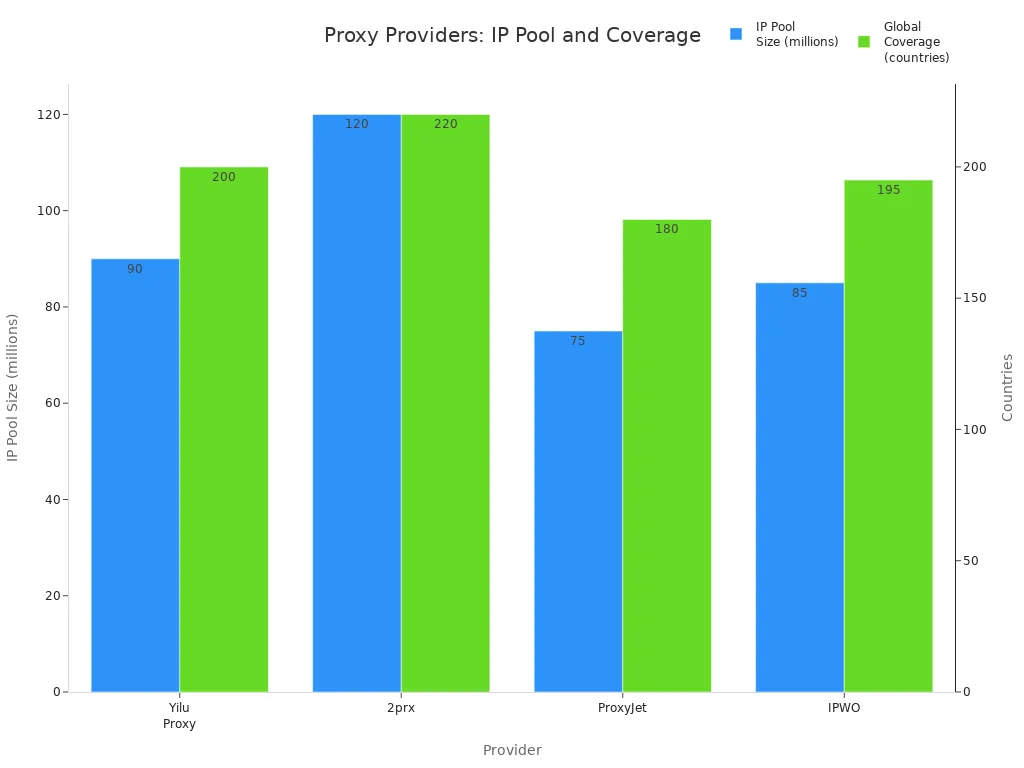
Note: To avoid slow speeds or losing connection, always check your proxy settings. Use sticky sessions for jobs that need a steady connection. Mobile proxies are good for social media. Rotating residential proxies are better for collecting data.
Now you know that rotating proxies, like mobile proxies, help keep you private online by changing your IP address a lot. You can use mobile proxies for web scraping, checking ads, and running many accounts. Each type—residential, data center, and mobile proxies—has its advantages. Mobile proxies offer robust privacy protection and help prevent you from being banned. Before picking one, think about what is good and bad about each. Try Yilu Proxy’s free trial to see if mobile proxies work for you.
FAQ
What is the main reason to use a rotating proxy?
You use a rotating proxy to hide your real IP address. This helps you avoid blocks and bans when you visit websites many times. You also get better privacy and can collect data more easily.
Can you use rotating proxies for streaming or gaming?
You can use rotating proxies for streaming or gaming, but it may not work well. Many streaming and gaming sites block proxy IPs. You may also see slower speeds or connection drops.
How do you know if a rotating proxy is working?
Check your IP address before and after connecting to the proxy. If the IP changes each time you refresh or make a new request, your rotating proxy works. Some providers also show your current IP in their dashboard.
Are rotating proxies safe to use?
Rotating proxies are safe if you choose a trusted provider. Always check reviews and avoid free proxies. Free proxies can steal your data or show you unwanted ads.
Do rotating proxies slow down your internet?
Rotating proxies can slow your connection a little.
Speed depends on the type of proxy and the provider.
Mobile and residential proxies may be slower than datacenter proxies.