
 By Yilu Support
Unblocked proxies grant access to online websites and platforms while providing important anonymity and security. But getting the most out of your unblocked proxy means ensuring you get your setup spot on before understanding how to use the unblocked proxy to its full potential.
While most of the best unblock proxy options are easy to set up and use, if you miss some of the finer details or ignore important setup steps, you may compromise your access and safety without even knowing it. This article will show you how to safely configure your unblocked proxy and how to use it correctly while getting the most out of its top features and capabilities.
Unblocked proxies 101
Before we get started, what are unblocked proxies, and why do we need them? In short, an unblocked proxy masks your IP address, which internet firewalls, blocks and filters use to identify you as a user without access permissions.
From regional restrictions and geo-blocking to restricted website access and shutting you out of websites you’ve visited before, everyone from regular light browsers to serious gamers and online entrepreneurs will know how frustrating these blocks and restrictions can be.
Unblocked proxies use typical proxy features and capabilities to get around these blocks by:
- Masking your real geographic location and allowing you to choose your own.
- Concealing your IP address and providing you with millions of others to use in its place.
- Providing enhanced capabilities and security safeguards that improve your online experience while keeping you safe from intruders and hackers.
To learn more about how unblocked proxies work and the features they offer to users, check out this detailed blog about the Best Unblocked proxy for 2025.

Steps: How to safely use an unblocked proxy
Using an unblocked proxy is straightforward. However, when it comes to some of the more technical specifics, understanding the basics here can help you to safely use an unlocked proxy with ease and confidence.
Before getting started
Get a good idea of the proxy factors that will influence what you’ll need to ensure you’re using an unblocked proxy that will work for you. Here are some of the most important aspects to consider before getting started.
- Agent & Rotating IP type – First, decide what agent type you need. Static unblocked proxies provide you with another IP address to use in place of your own. While good at getting past geo-restrictions, static IPs aren’t as effective at getting past blocks as rotating agent proxy types. Rotating proxies (also called dynamic proxies) constantly change out your IP address, providing better anonymity.
- IPs – Next, consider where your IPs will be coming from. Data center IPs offer great speed performance, while residential IPs are excellent for making you look like real devices and other users.
- Targeting – Look for the best unblock proxy that offers regional accessibility on different levels. This means being able to set your location by country, state or city. Also, opt for a proxy that provides location options in as many countries around the world as possible. The more regions the proxy covers, the more access you’ll have.
- Compatibility – Proxies that are compatible across all operating systems and that are SOCKS5 protocol-enabled will deliver a near-universal experience. Don’t forget to check if the proxy operates on an information format you can understand and that it works with different types of software.

Setting up your unblock proxy
Okay, so once you’ve figured out the parameters of what you need for your proxy and picked the best unblock proxy to use, it’s time to get started with setting up your unblocked proxy. Here, we’ve outlined the typical setup processes you should be familiar with. For easier understanding, let’s assume we’re setting up a rotating residential proxy (a very common choice for the best unblocked proxies).
- Preparing your device and account for the proxy – If you haven’t done so already, you’ll need to download the proxy’s software. This is usually a client program, and you can simply unzip the file and install it. Recharge your account with the necessary funds or credits. The top proxy services offer multiple payment options.
- Configure your unblock proxy – Next, inside the proxy interface, choose your agent and IP type (in this case, “rotating residential”) and pick your desired location, enter your account information using the information format provided, and choose the number of IPs you want the proxy to generate for you.
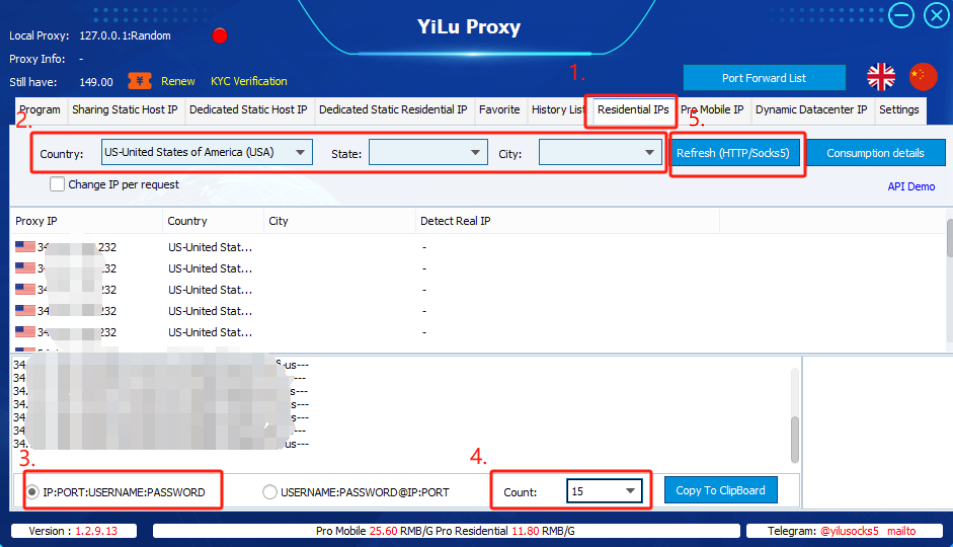
- Copying the IP information – Retrieve and check your IP addresses provided by the client. You should have a list of them by now. You can always check your real IP isn’t being used by clicking “detect IP” or a similar button. Then, simply copy your chosen IPs’ information to use as needed.
- Completing the setup – Take your copied IP information (remember, this is the information you’re going to be using for unblocking) and simply paste it into the software, mobile phone, or browser you’re going to be using it with.

Using your unblocked proxy
Now that you’ve set up your unblocked proxy, added the important information, and configured it to your specifications, it’s time to connect and start browsing safely and unrestricted!
- Connecting with your unblocked proxy – Open the software or browser you want to use with the unblocked proxy. Simply drag the software or browser you want to use with the unblocked proxy into the proxy interface and hit the “Connect” button. Make sure the proxy is working by double-checking its status indicator.
- When to use your unblocked proxy – You can use your proxy every time you connect to the internet. Whether to conceal your identity or to get around geographic limitations, there are no real restrictions. You can run your program or software out of the proxy’s “programs” tab and choose to turn it off whenever you don’t want to use it.
- Where to use your unblocked proxy – Use your proxy for everyday browsing, while gaming, when you’re streaming or for more advanced activities like data scraping or to optimize your activities. Unblocked proxies are effective for almost every online activity you can think of.
Common mistakes to avoid when using an unblocked proxy
Finally, it is important to avoid making common mistakes that could compromise your unblock proxy’s effectiveness and reliability.

- Using free proxies without verifying their safety – This is a big mistake that many users make, leaving them compromised and frustrated. Free unblock proxies are notoriously unreliable and dangerous. Always opt for a paid service to ensure accountability from the provider and security. Besides, you can always test out the unblocked proxy before paying for it by using a proxy server free trial. Consider looking for a SOCKS5 proxy free trial.
- Sharing sensitive information while connected to an untrusted proxy – Users are often lured into a false sense of safety when using an unreliable, low-quality unblock proxy, sharing delicate information while connected and falling victim to data mining.
- Relying solely on proxies for complete anonymity – Doubling down on your security is a smart move. While the best unblock proxy services will often cover all of your safety and anonymity needs, taking basic steps to protect yourself, like adding password access, running antivirus software and updating your device’s security, is always recommended. You can never be too careful.
YiLu Proxy SOCKS5 proxy free trial: Experience an unblocked proxy from a top proxy service
YiLu Proxy provides one of the best unblock proxy services in the world. The popular proxy server provider has top safety, with state-of-the-art features and unrivaled service. With many agent and IP type options to choose from, plus top performance and a simple setup, YiLu Proxy checks many of the unblocked proxy boxes.
YiLu Proxy’s flexible pricing, 99.99% uptime guarantee, and unlimited connections make it an attractive option for anyone looking for unchecked access. With more than 90 million SOCKS5 elite datacenter and residential IPs available across over 200 countries and multi-level targeting options, users can enjoy uninterrupted connections without having to worry about being blocked or limited.
As a paid service, users naturally wish to see for themselves what YiLu Proxy has to offer them. And now they can.

YiLu Proxy provides users with a complete proxy server free trial to test out the service’s SOCK5 proxy access. Take advantage of free unblocked proxy access through high-speed connections for between one and three days. Experience 120M dynamic residential traffic, 100M dynamic mobile phone data, 1G dynamic data room traffic, or between 6 and 20 shared data center IPs at no cost to you.
Enjoy access with no blocks or restrictions with YiLu Proxy and see what the service’s global node coverage and unlimited concurrent sessions has to offer. Just download the client, choose your preferred SOCKS5 proxy free trial, and start exploring YiLu Proxy’s service, free of charge, today!