
 By Yilu Support
Residential proxies use real IP addresses from people’s homes. They help keep your identity hidden online. Many new users want to buy residential ip proxy for privacy. Some use them for web scraping or to see content from other places. You can also use residential proxies for ad checking or market research. Some people use them for sneaker copping too. It is important to choose a good provider. Yilu Proxy lets you try it for free first. With good advice, you can use residential proxies without trouble.
Tip: Residential proxies help you stay private when you use the internet.
Key Takeaways
Residential proxies let you hide your identity online by using real home IP addresses.
Pick the best proxy type for your needs. Use rotating proxies for scraping. Use sticky proxies for steady sessions. Use static proxies for long-term use.
Always try out providers with free trials. This helps you check speed and reliability before you buy.
Find a provider you can trust. Make sure they have good customer support and clear prices. This helps you avoid hidden costs.
Keep learning about new proxy technology trends. This helps you get the most from your online activities and stay safe.
What Are Residential Proxies?
Residential proxies give you an IP address from a real house. When you use them, websites think you are a normal person. They do not see you as a robot or a business. This helps you do many things online. Residential proxies are different from other proxies. They use real devices and real places.
Key Features
You may want to know how residential proxies are not the same as datacenter proxies. Here is a table that shows how they are different:
Feature | Residential Proxies | Datacenter Proxies |
|---|---|---|
Ownership | People at home control them | Companies run them in big buildings |
Location | Tied to a real house address | Close to big internet wires, not homes |
Speed | Not the fastest | Very fast because of special machines |
Cost | Usually costs more | Often costs less |
Anonymity | Hard to block, looks like a real person | Easy to spot and block, often blocked |
Use Cases | Good for scraping and research | Good for streaming or downloading big files |
Residential proxies give you more privacy and choices. Other proxies might be faster or cheaper. But they do not make websites trust you as much.
Main Benefits
Residential proxies give you lots of good things. Here are some of the best parts:
You look like a real person, so you do not get blocked.
You can visit sites that only let people from certain places in.
You get steady connections for big jobs, like scraping websites.
You can check prices or ads from different places.
You can keep using streaming sites that block other proxies.
You can track SEO or do market research without trouble.
Residential proxies help you do more online. They are great for scraping, checking ads, and sneaker copping. You can pick rotating or static proxies to fit your needs. If you want privacy and good results, residential proxies are a smart pick.
Types of Residential Proxies
When you start looking at residential proxies, you’ll see there are a few main types. Each one works a little differently and fits different needs. Let’s break them down so you can pick the best one for your tasks.
Rotating Proxies
Rotating proxies change your IP address every time you make a request. You get a new identity with each click. This makes it tough for websites to track you or block you. If you want to collect lots of data or scrape many pages, rotating proxies help you stay anonymous and avoid bans.
Here’s a quick look at how rotating proxies compare to other types:
Proxy Type | IP Change Frequency | Session Maintenance | Anonymity | Cost | Detection Risk | Best For |
|---|---|---|---|---|---|---|
Rotating | Per request | Poor | Highest | Low | Low | Mass scraping |
Tip: Rotating proxies work best for big scraping jobs and tasks where you need lots of fresh IPs.
You also get perks like moderate pricing, unlimited bandwidth, and a user-friendly setup. The downside? Sometimes the IP quality isn’t great in certain regions, and you might pay extra for special features.
Sticky Proxies
Sticky proxies keep the same IP address for a set time, usually from 10 minutes up to 24 hours. You get a stable session, which is perfect for logging into accounts or running automation tools. The session timer starts with your first request, so you control how long you keep the same IP.
You can log into social media or scrape sites that don’t like frequent IP changes.
Sticky proxies help you avoid CAPTCHAs and bans.
You look like a real person, which boosts your success rate.
Note: Sticky residential proxies are great for tasks that need a steady connection and session persistence.
Static Proxies
Static proxies give you a fixed IP address that doesn’t change unless you want it to. You can use the same IP for weeks, sometimes up to 30 days. This makes static proxies super reliable for long-term projects.
You get long sessions without drops.
These proxies work well for account management and e-commerce monitoring.
You don’t have to worry about your IP changing in the middle of a task.
If you need a stable, long-lasting connection, static residential proxies are the way to go.
Backconnect Proxies
Backconnect proxies route your traffic through real devices in homes. You connect through a gateway, and the system picks the best exit location for you. This setup helps you look local to the target area and makes it hard for websites to spot you.
You can change your exit location easily for geo-targeted scraping.
These proxies use IPs from ISPs, so you avoid detection.
Backconnect proxies are perfect for checking local search results or verifying ads in different markets.
Backconnect residential proxies give you flexibility for complex workflows and geo-specific tasks.
No matter which type you choose, residential proxies help you stay private and get the job done. Pick the one that matches your goals, and you’ll see better results online.
Choose the Right Proxy
Assess Your Needs
To get the most from your residential proxy, think about what you want. Are you collecting data from websites? Maybe you need to check ads or handle social media accounts. Some people use proxies to see things from other countries. Your reason will help you pick the best type.
Here are some ways people use residential proxies:
Web scraping
Market research
Ad verification
Social media management
Getting around geo-blocks
Check how many IPs the provider has. More IPs mean more options and better safety. You need a service that works all the time. If the proxy stops, your work stops too. Good customer support helps if you have problems. Price matters, but rules and safety are important too. Pick a provider that follows the law and keeps you safe.
Let’s look at which proxy types work best for different jobs. This table shows which proxy is good for things like ad checking or social media:
Dimension | Residential Proxy | ISP Proxy | Mobile Proxy | Datacenter Proxy |
|---|---|---|---|---|
Trust level | High | Medium-high | Highest | Low |
Success rate on protected targets | 99%+ | High | Very high | ~60% |
Session stability | Variable | High | Variable | High |
Speed/latency | Slower | Fast | Variable | Fastest |
Best use case | Account management, high-anonymity tasks, ticket purchasing | High-volume scraping, SEO monitoring, e-commerce | Social media management, mobile ad verification, app testing | High-speed tasks on less-protected targets |
Instagram proxy suitability | Recommended | Consider | Recommended | Not recommended |
Facebook proxy suitability | Recommended | Acceptable | Recommended | Not recommended |
TikTok proxy suitability | Recommended | Acceptable | Highly recommended | Not recommended |
Tip: If you want strong safety for social media or ad checking, residential proxies are a good pick.
Compare Features & Prices
You want the best deal for your money. Look at what each provider gives you. Some have lots of IPs. Others are fast or easy to use. Check the features and see what matches your needs.
Here’s a table that shows what top providers offer in 2026:
Provider | Key Features | Pricing Model |
|---|---|---|
Nstproxy | High performance, massive pool of ethically sourced IPs, 99.9% success rate | Competitive and transparent |
Decodo | User-friendly interface, affordable pricing | Good value for smaller projects |
Oxylabs | Robust infrastructure, enterprise focus, dedicated support | Premium pricing |
Bright Data | Large proxy network, complex features | Higher price point |
Webshare | Focus on speed and customization, flexible plans | Affordable and customizable |
Nstproxy is fast and safe. Decodo is simple and good for small jobs. Oxylabs is best for big companies. Bright Data has many features but costs more. Webshare is good if you want speed and custom plans.
Prices change based on what you need. Here is what you might pay for each type:
Price Range | Features Included |
|---|---|
$3.5/GB | Residential proxies for many online jobs |
$5/GB | Premium rotating residential proxies with 50M+ IPs |
$0.6/GB | Datacenter proxies for fast access |
$3.75/GB | Mobile proxies for mobile jobs |
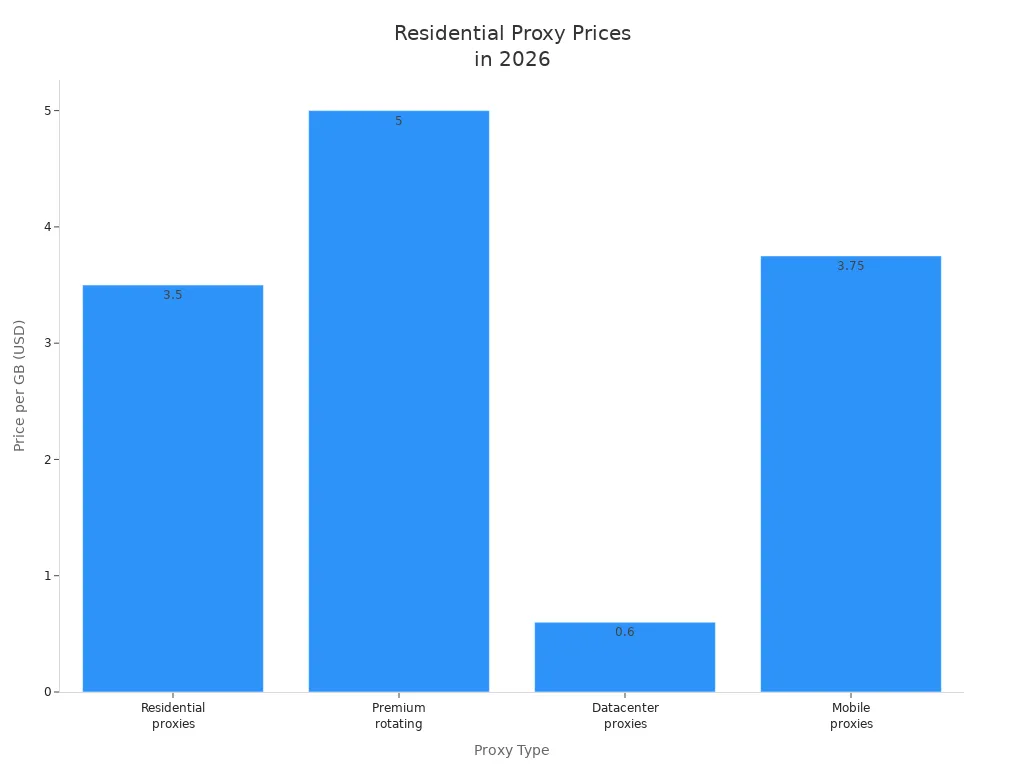
Note: Higher prices often mean better safety, more features, and stronger help.
Check Provider Reputation
You want a provider you can trust. Check what others say before you buy. Look for a big IP pool and many locations. This helps you stay hidden and keeps your data right. Extra features like auto rotation and different protocols make things easier.
Customer support is important. You want help fast if something breaks. Some providers have 24/7 help and special account managers. Prices should be clear. Watch out for hidden costs. Ethics and trust matter too. Read reviews and make sure the provider follows the rules. This keeps you safe and your work secure.
Here’s a table to help you see what matters most:
Criteria | Description |
|---|---|
Proxy pool size and locations | A large IP pool and many places help you stay hidden and get good data. |
Additional benefits | Extra features like different protocols and auto rotation make the service better. |
Customer support | 24/7 help and special account managers fix problems fast. |
Pricing | Knowing the price and any hidden costs helps you plan your budget. |
Ethics and reputation | Reading reviews and checking rules shows if the provider is honest. |
Try Yilu Proxy’s free trial. You can test their service and see if it works for you. This lets you check speed, safety, and trust before you pay.
If you follow these steps, you will find a residential proxy that fits your needs and keeps you safe. Take your time, look at your choices, and pick a provider that makes you feel good.
How to Buy Residential IP Proxy

Ready to buy residential ip proxy for your next project? You can follow a simple process to make sure you get the best service. Let’s break it down step by step so you feel confident from start to finish.
Research Providers
You want to start by looking at different proxy providers. Not all services are the same. Some offer better geo-targeting, more protocols, or easier ways to manage your proxies. You should check if the provider lets you target by city or ISP. This helps when you need to do web scraping or access content from specific places.
Here’s a table to help you compare providers:
Criteria | Description |
|---|---|
Geo depth and targeting fidelity | Providers should offer city-level and ISP targeting for reliable results. |
Protocols and authentication | Look for support for HTTP(S) and SOCKS5, plus flexible authentication to avoid login problems. |
Pricing mechanics | Compare cost per successful request, not just the headline price, to see the real value. |
Observability and support | Dashboards for error tracking and fast support make your life easier if something goes wrong. |
If you want to buy residential ip proxy for web scraping, you need a provider that gives you stable connections and good support. Don’t just pick the cheapest option. Saving money on proxies can lead to slow speeds, blocked IPs, or lost data. Quality matters more than price.
Test Free Trials
Most top providers offer free trials. You should always test before you buy residential ip proxy. Free trials let you see how the proxy works with your target websites. You can check speed, reliability, and success rates. This is important for web scraping, ad verification, or even sneaker copping.
Here’s why free trials help:
Benefit of Free Trials | Description |
|---|---|
Real-world testing | You can test proxies against actual websites and see how they perform. |
Performance assessment before commitment | You get to check success rates and reliability before spending money. |
Avoid reliance on promotional claims | You see the real results, not just what the provider promises. |
Try Yilu Proxy’s free trial. You can run web scraping tasks or scrape websites for data and see if the service fits your needs. This way, you avoid surprises after you pay.
Tip: Always use free trials to test proxies with your real workflow. You’ll know if the provider is right for you.
Review Terms & Policies
Before you buy residential ip proxy, you need to read the provider’s Terms of Service. These rules explain what you can and cannot do. You should also check the Privacy Policy and Cookies Policy. These documents tell you how your data gets handled and what rights you have. If you skip this step, you might run into problems later.
You want to know about any limits, exclusions, or special conditions. Some providers have rules about web scraping or how many IPs you can use. Make sure you understand everything before you pay.
Note: Reading the terms and policies keeps you safe and helps you avoid trouble with your proxy provider.
Purchase & Setup
Once you pick a provider, you can buy residential ip proxy and set it up. The process is easy if you follow these steps:
Choose your proxy plan and pay for it.
Log in to the provider’s dashboard.
Select ‘Residential’ as your proxy type.
Pick the format you want, like rotating or sticky.
Set your targeting options, such as country or city.
Enable features like SmartPath for better routing.
Generate your proxy link and copy it.
Add the proxy to your browser, bot, or scraping tool.
Monitor usage stats and traffic graphs to avoid wasting resources.
Save stable connections as profiles for future projects.
Group profiles by department if you work with a team.
Share credentials securely with teammates.
Schedule regular checks to make sure your proxies work in key locations.
Review usage stats during planning meetings to keep everything running smoothly.
If you want to buy residential ip proxy for web scraping, these steps help you get started fast. You can organize your proxies, share them with your team, and keep track of performance. This makes it easier to scrape websites for data, check ads, or manage social media accounts.
Alert: Don’t cut corners on quality. Cheap proxies can cause bans, slow speeds, and lost data. Always choose a trusted provider with good support.
You now know how to buy residential ip proxy the right way. Take your time, test before you buy, and read all the rules. You’ll get better results and avoid common problems.
Common Issues & Solutions
Avoid IP Bans
You want to keep your proxies working and your projects running smoothly. IP bans can stop you fast, but you can avoid them with smart moves. Here’s a table with some top strategies:
Strategy | Description |
|---|---|
Rotate IPs frequently | Change your IP often so websites can’t spot patterns. |
Manage request rates | Send fewer requests from each IP to look like a real person. |
Use realistic headers | Add browser-like headers to your requests for better anonymity. |
Mimic human behavior | Add random delays and mouse moves to act less like a bot. |
You can also pace your requests and randomize headers. This helps you blend in with normal traffic. If you use these tricks, you keep your anonymity and lower your risk of bans.
Tip: Always rotate your proxies and act like a real user to stay safe.
Ensure Quality & Speed
You want your proxy to be fast and reliable. Here are some things to check before you buy:
Look for a big IP pool. More IPs mean better performance and less chance of bans.
Make sure the provider covers the locations you need.
Test the speed and success rate. Low latency means your tasks finish faster.
If you see errors like Proxy Authentication Error 2606, check your settings. Sometimes, expired or missing credentials cause problems. You can fix this by clearing old credentials, resetting your network, or reconnecting your accounts. Keeping your setup fresh helps you keep your anonymity and speed.
Note: A good provider will help you solve these issues quickly.
Spot Scams
You need to watch out for scams when you buy residential proxies. Some services use mobile apps to turn people’s devices into proxies without asking. This is not safe. Others use poor connections or even fake traffic for ad fraud. Here are some warning signs:
The provider cannot explain where their IPs come from.
You see lots of failed connections or slow speeds.
The service asks for strange permissions or uses shady apps.
You get charged for clicks or views that are not real.
If you notice these signs, walk away. Always pick a provider with clear rules and good reviews.
Alert: Trust your gut. If something feels off, it probably is.
Best Practices for Residential Proxies
Safe Usage Tips
You want to keep your online activity safe when you use residential proxies. Start by choosing strong passwords for your proxy accounts. Always update your software and browser. If you see strange activity, change your proxy credentials right away. Never share your proxy details with people you do not trust. Use only trusted providers that explain where their IPs come from. If you follow these steps, you lower your risk of getting blocked or hacked.
Tip: Rotate your proxies often and avoid sending too many requests at once. This helps you look like a real user.
Maximize Value
You can get more out of your residential proxies if you pick the right type for your job. Some proxies work better for speed, while others help you stay anonymous. Check out this table to see how different proxies compare:
Proxy Type | Features | Pricing |
|---|---|---|
Datacenter Proxies | Fast speeds from premium data centers | Starting at $2.99/month for 100 shared IPs |
Static Residential Proxies | Real home IPs, fixed for long sessions | Starting at $6/month for 20 IPs with 250GB bandwidth |
Rotating Residential Proxies | Access to millions of real IPs in many countries | $7/GB with bulk discounts |
If you want to save money, look for bulk discounts. You can also share proxy access with your team to cut costs. Try different proxy types to see which one fits your workflow best.
Note: Test your proxies before you buy a big plan. This helps you avoid wasting money.
Stay Updated
Proxy technology keeps changing. You need to know what’s new so you can stay ahead. In 2026, providers use AI to manage proxies and spot bans faster. Some companies build platforms that combine proxies with other data tools. Prices have dropped, so now is a good time to try new services. Providers focus more on ethical sourcing, making sure IPs come from real users with permission.
Here’s a quick look at the latest trends:
Trend | Description |
|---|---|
AI-powered proxy management | Machine learning helps pick the best proxies and avoid bans. |
Agentic AI | AI agents need proxies that keep sessions stable and scale easily. |
Ethical sourcing | Providers show where their IPs come from to build trust. |
Vertical integration | Proxies are now part of bigger data platforms. |
Price drops | Lower costs make it easier to upgrade or switch providers. |
Residential proxy dominance | Residential IPs are the top choice for web data tasks. |
Stay curious! Check for updates from your provider and try new features when they launch.
You have learned why proxies are useful and how to choose one. First, pick a provider you can trust. Make sure they show their prices and get IPs the right way. Free trials let you try the service before you pay. Picking a good provider is important for these reasons:
Reason | Why It Helps |
|---|---|
Ethical sourcing | Keeps your accounts safe and protects your reputation |
Transparent pricing | Makes it easy to manage your budget |
Better proxy effectiveness | Gives you smoother, more reliable results |
Are you ready to begin?
Choose a provider with good support
Try a free trial to test it
Think about your goals and start now
You can buy residential proxies without worry and get good results.
FAQ
What is a residential IP proxy?
A residential IP proxy gives you an IP address from a real home. Websites see you as a regular user, not a bot. This helps you stay private and avoid blocks.
Can I use residential proxies for streaming or gaming?
Yes, you can! Residential proxies help you access content from other countries. You can watch shows or play games that are not available in your area.
How do I know if a proxy provider is safe?
Check reviews and look for clear information about where the IPs come from. Trusted providers explain their sources and have good customer support. Try a free trial before you buy.
Will using a residential proxy slow down my internet?
Sometimes, yes. Residential proxies may be slower than datacenter proxies. The speed depends on the provider and the location of the IP. Always test the proxy first.
Do I need technical skills to set up a residential proxy?
No, you do not need to be a tech expert. Most providers offer easy setup guides. You just copy the proxy details and paste them into your browser or tool.