
 By Yilu Support
Looking for the best way to use a proxy on android? You have three top choices: Yilu Proxy, Shadowsocks, and SocksDroid. Yilu Proxy stands out with a free trial you can grab here. Shadowsocks gives you strong security, while SocksDroid makes setup simple. If you want an android socks5 proxy that fits your needs, keep reading for reviews and tips.
Key Takeaways
Yilu Proxy gives a free trial. It has many IP addresses. This is good for streaming and gaming.
Shadowsocks uses strong encryption. It is open-source. It is great for people who care about privacy and security.
SocksDroid is easy to use. It has strong encryption. It is a good pick for beginners.
When picking a SOCKS5 proxy app, look at speed, security, how easy it is, and customer support.
Try different apps. Find the one that works best for your needs like speed, privacy, or simplicity.
Best Android SOCKS5 Proxy Apps
Picking the right android socks5 proxy can be hard. You want it to be fast and safe. It should also be easy to use. Let’s check out three top socks5 apps for Android. These are Yilu Proxy, Shadowsocks, and SocksDroid. Each app has something special.
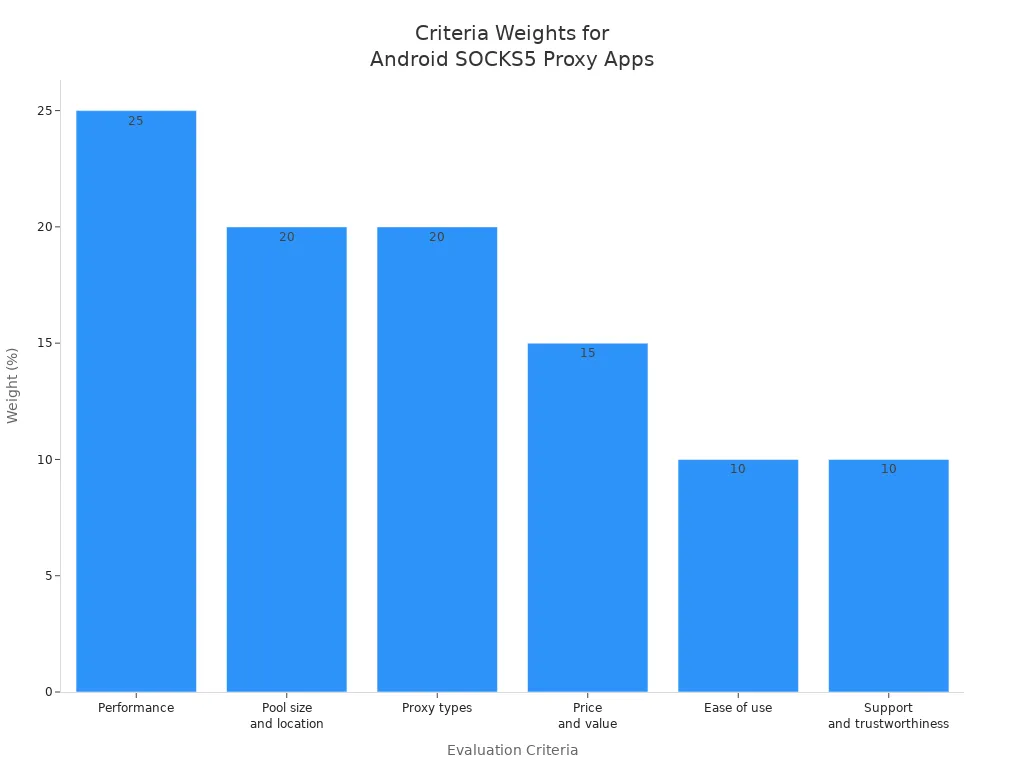
Before you choose, look at what matters most. People use some main things to pick a socks5 app. These things help you find the best app for you.
Criteria | Description |
|---|---|
Performance (25%) | Checks speed, reliability, and how steady the connection is. |
Pool size and location (20%) | Looks at how many IP addresses there are and where they are. |
Proxy types (20%) | Sees what kinds of proxy types you can use. |
Price and value (15%) | Compares prices, plans, and refund rules to see if it’s a good deal. |
Ease of use (10%) | Rates how simple it is to set up and use every day. |
Support and trustworthiness (10%) | Tests how fast and helpful customer support is. |
Yilu Proxy App
Yilu Proxy is great if you want a simple socks5 app. It gives you lots of IP addresses from many places. You can use different proxy types with this app. Switching between socks5 and other types is easy. Yilu Proxy is simple to set up, even for beginners. You get a free trial to test everything first.
Tip: If you want to unlock blocked content or need a strong connection for games, Yilu Proxy gives you many options.
Shadowsocks App
Shadowsocks is popular with people who want privacy and speed. It uses strong encryption to keep your data safe. The app works quickly and does not slow down your phone. Shadowsocks is open-source, so you know what it does. You can use it on Android and other devices. Many users pick Shadowsocks to get past firewalls and reach blocked sites.
Here’s why people like Shadowsocks:
Strong encryption keeps your data private
Fast and does not use much space
Open-source
Works on many devices including Android
Good for getting past firewalls and blocked sites
Shadowsocks keeps your connection safe with these things:
Feature | Description |
|---|---|
Strong Encryption | Uses advanced encryption to keep your data safe. |
Traffic Protection | Has features to stop others from watching what you do. |
Privacy Protection | Does not keep logs of your traffic. |
Global Access | Lets you reach content from anywhere safely. |
Shadowsocks is a safe link between your device and the internet. It hides your traffic and sends it through a proxy server. Your traffic looks normal, so it is harder to block or spot.
SocksDroid App
SocksDroid is good if you want a socks5 app that is easy to use. You do not need to change many settings. The app lets you use user authentication, so only you can use your proxy. SocksDroid uses 256-bit SSL encryption to keep your connection safe. The app has a simple design that makes it easy to manage your android proxy.
Feature | Description |
|---|---|
User Authentication | User/pass authentication |
Encryption | 256-bit SSL Encryption |
If you want a simple socks5 app, SocksDroid is a smart choice. You get safety and ease in one app.
All three apps have something special. Yilu Proxy gives you many IP addresses and a free trial. Shadowsocks has strong security and is open-source. SocksDroid is easy to set up and use every day. You can choose the best socks5 app by looking at speed, safety, and how easy it is to use.
Yilu Proxy Review
Features
Yilu Proxy gives you a lot of features that make your online life easier. You get access to thousands of IP addresses from many countries. You can switch between socks5, HTTP, and HTTPS proxy types. This socks5 app lets you choose the best connection for your needs. You also get fast speeds and stable connections. If you want to unlock websites or play games without lag, Yilu Proxy helps you do that.
Feature | What You Get |
|---|---|
Huge IP Pool | Many IPs from global cities |
Multiple Proxy Types | socks5, HTTP, HTTPS |
Fast Speeds | Quick and steady connections |
Easy Switching | Change proxy types anytime |
Ease of Use
You do not need to be a tech expert to use Yilu Proxy. The app has a simple design. You can set up your socks5 connection in just a few taps. The menus are clear, and you see helpful tips as you go. If you get stuck, you can check the guide or ask for help. You will find it easy to change settings or switch servers.
Tip: Try the free trial first. You can test all the features before you pay.
Pros & Cons
Here is a quick look at what you get and what you might not like:
Pros:
Big pool of IP addresses
Simple setup for beginners
Free trial available
Fast and stable socks5 connections
Cons:
Some features need payment after the trial
Advanced settings may confuse new users
Setup Guide
You can set up Yilu Proxy in a few steps:
Download the Yilu Proxy socks5 app from the official site.
Open the app and sign up for a free trial.
Pick your proxy type (choose socks5 for best privacy).
Select a server location.
Tap “Connect” and start browsing safely.
If you want to use the android socks5 proxy for games or streaming, pick a server close to your location.
Free Trial Info
Yilu Proxy gives you a free trial so you can test everything. You get full access to the socks5 features and the big IP pool. You can sign up for the trial here. Try it out before you decide to buy.
Shadowsocks Review
Features
Shadowsocks gives you strong privacy and fast speeds. You get open-source code, so you know what the app does. The app uses advanced encryption to keep your data safe. You can use Shadowsocks on many devices, not just Android. It works well with the socks5 protocol, which helps you hide your traffic and reach blocked sites. You can also set custom server settings. This lets you pick the best connection for your needs.
Feature | Benefit |
|---|---|
Encryption | Keeps your data private |
Open-source | Lets you check the code |
Multi-platform | Works on Android and more |
Custom servers | Choose your own connection |
Ease of Use
You do not need to be a tech expert to use Shadowsocks. The app has a simple design. You can set up your socks5 connection in a few steps. The menus are clear, and you see helpful tips as you go. You can switch servers with just a tap. If you want to use an android socks5 proxy, Shadowsocks makes it easy.
Tip: Try different servers to find the fastest one for your location.
Pros & Cons
Here is a quick look at what you get and what you might not like:
Pros:
Strong security with socks5 support
Fast speeds for browsing and streaming
Free and open-source
Works on many devices
Cons:
No built-in customer support
Some settings may confuse beginners
Setup Guide
You can set up Shadowsocks in a few steps:
Download Shadowsocks from the Play Store.
Open the app and tap “Add Server.”
Enter your server details and choose socks5 as the protocol.
Save your settings.
Tap “Connect” and start browsing safely.
You can change servers anytime if you need a better connection.
SocksDroid Review
Features
SocksDroid gives you a simple way to use socks5 on your Android device. You get user authentication, so only you can use your proxy. The app supports 256-bit SSL encryption, which helps keep your connection safe. You can manage multiple proxy profiles and switch between them quickly. SocksDroid works with many apps, so you can use it for browsing, streaming, or gaming.
Feature | What It Means for You |
|---|---|
User Authentication | Protects your proxy access |
SSL Encryption | Keeps your data secure |
Multiple Profiles | Easy to switch connections |
App Compatibility | Works with most Android apps |
Ease of Use
You do not need to be a tech expert to use SocksDroid. The app has a clean design. You see clear buttons and simple menus. You can add a new socks5 proxy in just a few steps. The app shows helpful tips if you get stuck. You can switch between profiles with one tap. SocksDroid makes it easy for anyone to set up and use a proxy.
Tip: If you want a quick way to start, use the default settings first. You can change them later if you need more control.
Pros & Cons
Here is a quick look at what you might like and what you might not:
Pros:
Simple setup for socks5 connections
Strong encryption for safety
User authentication keeps your proxy private
Cons:
No advanced features for power users
Limited customer support
Setup Guide
You can set up SocksDroid in a few easy steps:
Download SocksDroid from the Play Store.
Open the app and tap “Add Proxy.”
Enter your socks5 server details, username, and password.
Save your profile.
Tap your new profile to connect.
You now have a working android socks5 proxy. You can switch profiles or disconnect anytime.
Proxy Comparison

Feature Table
You might wonder how these top apps stack up against each other. Here’s a quick table to help you see the main features side by side. This makes it easy for you to pick the right socks5 app for your needs.
Feature | Yilu Proxy | Shadowsocks | SocksDroid |
|---|---|---|---|
Free Trial | Yes | No | No |
Encryption | Yes | Yes | Yes |
User Authentication | Yes | No | Yes |
Open Source | No | Yes | No |
Multiple Proxy Types | Yes | No | No |
Easy Setup | Yes | Yes | Yes |
Customer Support | Yes | No | Limited |
App Compatibility | High | High | High |
Tip: Use this table when you want to compare socks5 apps at a glance. It saves you time and helps you focus on what matters most.
Best Use Cases
Each app shines in different situations. You should pick the one that matches your needs.
Yilu Proxy: Great if you want to use a proxy on android for streaming, gaming, or unlocking websites. You get a free trial, so you can test everything first. The big IP pool helps you find fast connections.
Shadowsocks: Perfect if you care about privacy and want open-source software. Many people use this socks5 app to get past firewalls or browse safely in public places.
SocksDroid: Best for beginners who want a simple socks5 setup. You get user authentication and strong encryption. You can use it with many Android apps.
If you want to switch between different proxy types or need lots of IP addresses, Yilu Proxy gives you more options. If you want strong privacy, Shadowsocks is a solid pick. For easy setup, SocksDroid works well.
You can now choose the socks5 app that fits your daily routine. Think about what you need most—speed, privacy, or simplicity.
Best Proxies for Android: Alternatives
Other Notable Apps
You might want to use a different app than the main ones. There are many other apps that work well as proxies for android. Some apps have special features or do unique things. Here are some you should know about:
App Name | Features | User Experience |
|---|---|---|
SOCKS5 – IPv6 & IPv4 Proxy VPN | Works with IPv6 and IPv4, easy to set up | Good for getting past blocks |
Tun2Socks | Sends all traffic through SOCKS5 | Good for users who know more |
Tun2TAP | Makes virtual network interfaces | Great for testing and automation |
Drony | Controls proxy for each app, flexible rules | Useful for app-specific proxy needs |
Android Proxy Server | Makes your device a proxy server | Good for sharing internet connections |
Antidetect Browser | Has SOCKS5 built in, privacy features | Popular for users who want privacy |
IPVanish | SOCKS5 support, fast for torrenting | Gets good reviews for speed and reliability |
Mullvad VPN | SOCKS5 proxy, quick downloads | Great for P2P and privacy |
Private Internet Access | SOCKS5 proxy, strong performance | High ratings for torrenting |
You might wonder when to use these other apps. Sometimes you need more control or want to fix a certain problem. For example, if you want to get past firewalls or blocked sites, a SOCKS5 proxy can help. If you want to choose which apps use a proxy, Drony lets you set rules for each app. Some people like Tun2Socks or Tun2TAP because they are light and do not slow down your device.
Here are some common situations and why these apps can help:
Scenario | Advantage |
|---|---|
Get past firewalls and blocks | Lets you see blocked content and avoid censorship. |
Control traffic for each app | Assign proxies to certain apps for testing or automation. |
Lighter and faster than VPNs | Use SOCKS5 for scraping or streaming without slowing down your device. |
Tip: If you want the best proxies for android for torrenting or P2P, try IPVanish, Mullvad VPN, or Private Internet Access. These apps are fast and reliable.
You have lots of choices for finding the right android proxy. Think about what you need most—speed, privacy, or special features. Try a few apps to see which one works best for you.
You have lots of choices when you want the best proxies for android. Here’s a quick look at what makes each android proxy app strong:
App | Speed | Security | Easy Setup | Global IPs | Support |
|---|---|---|---|---|---|
Yilu Proxy | ✅ | ✅ | ✅ | ✅ | ✅ |
Shadowsocks | ✅ | ✅ | ✅ | ||
SocksDroid | ✅ | ✅ | ✅ |
If you want to use a proxy on android with a free trial, Yilu Proxy is a smart pick. Beginners like SocksDroid for simple setup. Advanced users choose Shadowsocks for privacy. Try the best proxies for android and share your experience with the proxy server or any android proxy app you like!
FAQ
How do I know if my SOCKS5 proxy is working on Android?
You can check your IP address before and after connecting. Use a site like whatismyip.com. If your IP changes, your proxy works. Some apps also show connection status.
Can I use a SOCKS5 proxy for all my Android apps?
Most SOCKS5 proxy apps let you route all traffic through the proxy. Some, like Drony, let you pick which apps use the proxy. Check your app’s settings for this feature.
Is using a SOCKS5 proxy safe?
A SOCKS5 proxy adds privacy by hiding your real IP. It does not encrypt your data unless the app supports encryption. For extra safety, pick apps with SSL or strong encryption.
Tip: Always use trusted proxy apps from official sources.
How do I set up a SOCKS5 proxy on Android manually?
You can set up a SOCKS5 proxy in some apps or in your Wi-Fi settings. Here’s a quick example:
Settings > Wi-Fi > Tap your network > Modify > Advanced > Proxy > Manual
Enter your proxy details and save.