
 By Yilu Support
Are you trying to find an easier way to manage many Instagram accounts in 2025? You can use mobile proxies for Instagram to keep your accounts safe and neat. Mobile proxies protect your accounts better than residential proxies. Your accounts look more real to Instagram. When you set up mobile proxies on your device, it makes managing accounts easier. It also makes things less risky. Try Yilu Proxy’s free trial to see how easy and safe it is.
Key Takeaways
Mobile proxies help keep your Instagram account private and safe. They make your account look real to Instagram. Using mobile proxies can stop blocks and limits. This helps you manage many accounts more easily. Pick a good proxy provider like Yilu Proxy for better service. Good providers have features like sticky sessions. Change your proxies often to act like a normal user. This lowers the chance of getting your account banned. Watch your account health by checking likes and comments. Change your proxy settings if you need to.
Why Use Mobile Proxies for Instagram?
Key Benefits for Account Management
You want your Instagram account to be safe. You also want it to work well. Mobile proxies help you do this. They make your traffic look like it comes from real phones. Instagram trusts traffic from phones more. You get more privacy. You can manage more accounts without getting blocked.
Here are some top benefits of mobile proxies:
Benefit | Description |
|---|---|
Enhanced Privacy and Anonymity | Mobile proxies hide your real IP address. This makes it hard for websites and ISPs to track you. |
Bypass Geo-restrictions and Censorship | You can look like you are in different places. This helps you avoid blocks. |
Avoid Blocks, CAPTCHAs, and Rate Limits | Rotating IPs make it harder for Instagram to detect you. You can keep using your accounts. |
Tip: If you help clients with social media, mobile proxies make your job safer and easier.
Mobile proxies also give strong security. You get real carrier attribution. Instagram thinks your traffic is real. CGNAT traffic sharing helps you blend in with other users. You also get better platform compatibility. Instagram works best with mobile devices.
Advantage | Description |
|---|---|
Authentic Carrier Attribution | Your traffic looks real. Instagram is less likely to detect you. |
CGNAT Traffic Sharing | You act like a normal user. This makes your traffic look more real. |
Improved Platform Compatibility | Instagram is made for phones. Mobile proxies help everything run smoother. |
Mobile vs. Residential Proxies
You may wonder how mobile proxies are different from residential proxies. Mobile proxies get detected less often. Instagram almost never flags them. You get sticky sessions. Your connection stays steady. Instagram trusts mobile proxies more than residential proxies.
Proxy Type | Detection Rate | Session Persistence | Platform Trust |
|---|---|---|---|
Datacenter | 65-75% flagged | Poor (frequent rotation) | Very Low |
Residential | 40-45% flagged | Moderate | Medium |
Mobile | Below 2% flagged | Excellent (sticky sessions) | High |
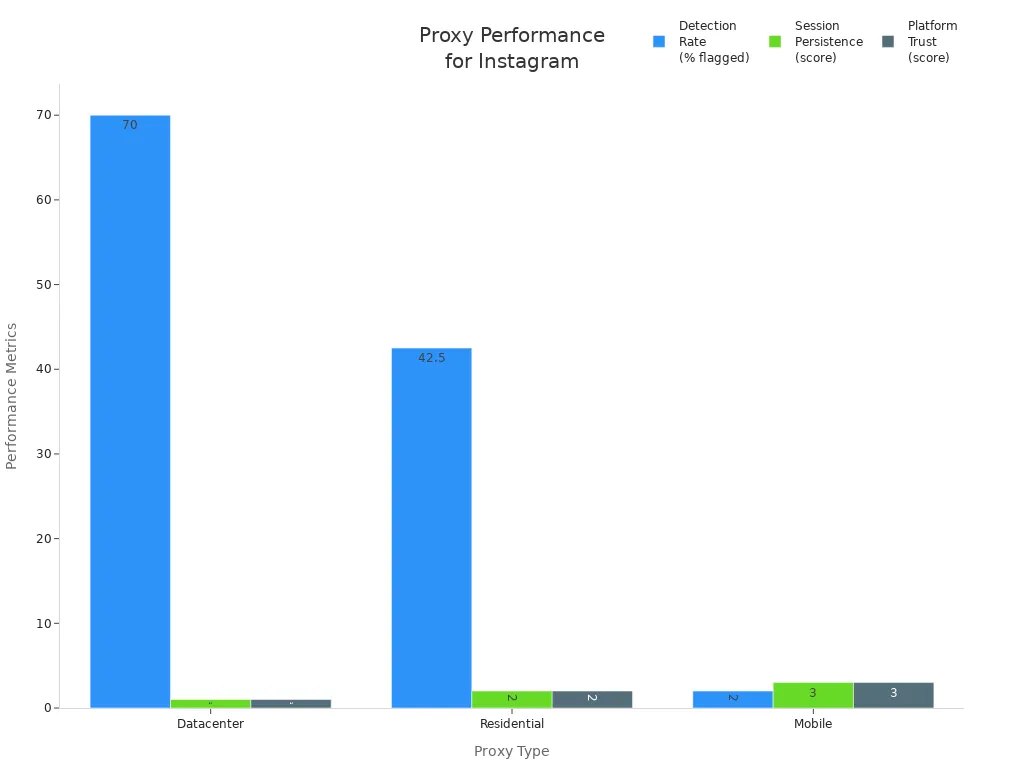
If you want the best results for social media, use mobile proxies. You get better security. You get more privacy. Instagram trusts you more.
Setting Up Mobile Proxies for Instagram
Choosing a Provider
You want good proxies for Instagram. Picking the right provider helps you stay safe. You should choose one with a good name, fair prices, and useful features. Here is a table to help you compare:
Criteria | Description |
|---|---|
Provider Reputation | Read reviews and check if the provider uses honest IP sources. |
Pricing Models | Look at pay-per-GB and pay-per-IP plans. Pick what fits your money and needs. |
Essential Features | Find providers with 99.9% uptime, helpful support, and easy dashboards. |
Yilu Proxy is great for instagram management. You get over 90 million IPs in more than 200 countries. Yilu Proxy has sticky sessions. This helps your connection stay steady. You can pay with Alipay or USDT. Some other providers do not have these things. Yilu Proxy gives you a free trial. You can try mobile proxies for Instagram before you buy. Try Yilu Proxy’s free trial here.
Feature | Yilu Proxy | Other Proxies |
|---|---|---|
IP Type | Residential/Database IP | Residential IP |
IP Number | 90M+ IPs | Not specified |
Country Coverage | 200+ Countries | 190+ Countries |
IP Rotation | Sticky session | No |
Payment Methods | Alipay/Crypto Currency | Crypto Currency |
Tip: Always test your provider’s proxy speed and how well it works before using it for social media.
Configuring Proxies on Mobile Devices
Setting up mobile proxies on your phone is easy. You can do this on Android and iOS. Here are the steps:
Go to your device’s Settings.
Tap Wi-Fi and pick your network.
Press the Info icon next to your network.
Scroll to HTTP Proxy and tap Configure Proxy.
Choose Manual and type your proxy server and port.
If your IP is not whitelisted, turn on Authentication. Type your username and password.
You can also pick Automatic and enter the PAC file URL if your provider gives you one.
Test your proxy by going to a site like IPleak.net. Check if your IP address changed.
To turn off the proxy, go back to Wi-Fi settings. Tap your network, scroll to Configure Proxy, and pick off.
If you use automation tools for instagram management, mix mobile proxies with official sources. Make sure each account uses a different cloud phone. Use smart RPA automation that acts like a real person. This helps warm up accounts and keeps them safe.
Note: Always watch your proxy’s performance. Check IP health and connection often.
Connecting Instagram Accounts
You want to manage many profiles without problems. Connecting your Instagram accounts to different mobile proxies keeps them safe. Here is a simple guide:
Open your device settings.
Tap Wi-Fi or Network & Internet.
Find your Wi-Fi network and tap it.
Go to Proxy or Advanced.
Pick Manual proxy setup.
Type the proxy IP address and port from your provider.
If needed, type your proxy username and password.
Save your settings and restart your device.
When you use automation tools, add your proxy info to each bot or app. Test the connection to make sure it works. Watch your success rates and change settings if you need to.
Alert: Do not do too much like following or posting a lot. This can get your account flagged. Use rotation to lower your risk.
Here are some mistakes to avoid:
Do not do too much too fast. Instagram may block you.
Always use rotation to switch IPs and keep your accounts safe.
Watch your proxy’s health and connection.
If you follow these steps, you can manage many profiles with mobile proxies for Instagram. You get better privacy and security than with residential proxies. You also make account warming easier and safer.
Managing Multiple Instagram Accounts Safely

Rotating Mobile Proxies for Instagram
You want to handle many profiles and not get caught. Rotation helps you do this. Change your IP address every 10 to 15 minutes. This makes your actions look normal. Session-based rotation stops Instagram from seeing patterns. If you use automation tools, set them to switch proxies after each session. This keeps your accounts safe and lowers the chance of bans.
Here are some smart steps for safe rotation:
Give each account its own proxy.
Rotate proxies on a set schedule.
Use browser profiles like Gologin or Multilogin to keep sessions apart.
Share profiles with your team but do not share passwords.
Tip: Rotation works better with mobile proxies than with residential proxies. You blend in with real phone users.
Avoiding Detection and Bans
Managing Instagram accounts can be risky. Instagram checks for sudden jumps in activity. It looks for repeated comments and the same IP used for many accounts. To avoid bans, act like a real person. Start slow with new accounts. This is called account warming. Do more actions over time. Always use strong passwords and turn on two-factor authentication. Never log in from public WiFi.
Risk Type | What Happens | How to Stay Safe |
|---|---|---|
Association Risk | Accounts get linked and flagged | Use unique device signatures |
Digital Fingerprint Problem | Accounts look too similar | Change browser profiles and devices |
Team Collaboration Risks | Overlapping sessions cause issues | Centralize credentials and keep activity logs |
Note: Keep each account separate. Use different proxies and devices for each one. This makes managing social media easier.
Monitoring Account Health
You need to watch your accounts for warning signs. If you see fewer likes or comments, your account might have problems. Sometimes, hashtags stop working or your posts do not show up in searches. Ask a friend to check if your post shows under a hashtag. Track your engagement numbers every week. If you see problems, slow down and check your proxy rotation.
Engagement drops? Pause and check your setup.
Hashtags not working? Try posting a new one.
Followers not seeing your posts? Post at different times.
Your posts get fewer likes, comments, or shares than before, even if you post often. This means your account needs help.
If you follow these steps, you can handle many profiles safely. Mobile proxies and smart rotation help you stay ahead and keep your accounts healthy.
Tools and Resources for Mobile Proxies for Instagram
Recommended Apps and Services
Managing Instagram accounts can be simple with the right apps. Many apps and services work well with mobile proxies for Instagram. These tools help you do things faster and keep your accounts safe. Some apps let you control many accounts at once. Others help you watch your followers and see how your posts are doing right now.
Here is a table that shows what these tools can do:
Feature | Description |
|---|---|
Automation | Automate actions on Instagram and other social media. |
Unlimited Accounts | Manage as many accounts as you want. This is good for agencies and marketers. |
Real-time Monitoring | Check your followers, likes, and results in one place. |
Built-in Proxy Tools | Use rotating or special proxies to keep accounts safe from bans. |
AI-driven Content Tools | Use smart tools to help you make and post better content. |
These apps help you manage social media and stay hidden. They help you follow Instagram’s rules. You get more control over your accounts. You also avoid problems that happen with residential proxies. Rotation in these tools keeps your accounts safe.
Tip: Choose apps that work with mobile proxies. This helps you get the best proxies for Instagram and avoid bans.
Yilu Proxy Free Trial
You can try mobile proxies before you pay money. Yilu Proxy gives you a free trial. You can see how it works for Instagram account management. Yilu Proxy lets you use sticky sessions and fast rotation. You get millions of mobile proxies. This helps you manage many accounts at the same time.
Yilu Proxy works with most automation tools. You can set up your proxy in just a few minutes. The dashboard is easy to use. You can check your proxy and change settings quickly. If you need help, support is ready to help you.
Note: Try the free trial to see if Yilu Proxy is right for your social media needs. You can compare it with residential proxies and see which one is better for you.
If you want safe and easy Instagram management, Yilu Proxy is a smart pick. You get strong privacy, fast rotation, and support for all your accounts.
You learned how to use mobile proxies for Instagram account management in 2025. Pick a trusted provider like Yilu Proxy and try their free trial. Follow smart steps to keep each account safe. Use rotation and watch for changes. Stay updated on Instagram’s rules. For better social media management, always use the best tools.
Tip: Keep learning new tricks. This helps you stay ahead and protect your accounts.
FAQ
How do mobile proxies help you manage Instagram accounts?
Mobile proxies make your actions look like they come from real phones. You can run more than one account without getting blocked. Instagram trusts mobile traffic more than other types.
Can you use mobile proxies with Instagram automation tools?
Yes, you can. Most automation tools let you add proxy details. You just enter the proxy IP and port. This keeps your accounts safe and helps you avoid bans.
Is it safe to use mobile proxies for Instagram?
You stay safer with mobile proxies than with residential ones. Instagram sees your traffic as normal phone activity. Always rotate proxies and avoid doing too much at once.
What should you do if your Instagram account gets flagged?
Pause your activity. Check your proxy setup. Try switching to a new proxy. Warm up your account slowly. If problems continue, contact support for help.