
 By Yilu Support
A mobile ip proxy lets you use the internet through a real mobile network. You connect with a sim card. This makes your device look like a normal phone or tablet on the carrier’s system. You get a real mobile ip proxy address that is hard to find. Many mobile proxies use special sim connections and CGNAT technology for more privacy. By June 2025, 63% of all web traffic comes from mobile networks. You can try these features with Yilu Proxy’s free trial.
Key Takeaways
Mobile IP proxies use real SIM cards to get online. This makes your device look like a regular user on the carrier network.
Using a mobile proxy helps keep your online activity private. It copies how real users act, so websites have trouble spotting your proxy use.
Mobile proxies let you get around geo-restrictions. You can see content from other places by picking IPs from different cities or countries.
Businesses use mobile proxies to get real mobile IPs. This lowers the chance of getting blocked when testing ads or gathering data.
Yilu Proxy gives a free trial. You can try mobile IP proxies and see their benefits before you decide to buy.
Mobile IP Proxy Technology
SIM Authentication and Connectivity
When you use a mobile proxy, your device goes online with a real SIM card. This makes you look like a normal user on the carrier network. The SIM card is important because it helps only trusted devices get on the network. Here is how the authentication works:
The SIM card has a secret key called K_i. This key is special and stays inside the SIM card.
The carrier network sends a random number, called RAND, to your SIM card.
Your SIM card uses the secret key and the random number to do a special math problem.
The SIM card makes a signed answer, called SRES, and sends it back to the carrier network.
The carrier network checks if the answer matches its own math. If it matches, you can use the network.
This keeps your connection safe and private. Only the right SIM card can connect to the carrier network. When you use a mobile proxy, you get your own connection with a real SIM card. This gives you a real mobile IP address that websites see as real.
You can check if your proxy uses a real SIM card by doing these things:
Step | Description |
|---|---|
1 | Set up the proxy in your browser or with curl. Use an IP lookup tool to see if the IP belongs to a mobile carrier. |
2 | Make several requests to a close target. Check if the average wait time is under 800ms. |
3 | Change the connection. See if the IP changes in 10–20 seconds. |
4 | Go to a detection site. Make sure your real IP does not show and DNS requests use the proxy. |
Carrier Networks and CGNAT
Carrier networks use special systems to help many users at once. One system is called CGNAT, or Carrier-Grade Network Address Translation. CGNAT lets carriers share a few public IP addresses with many users. When you use a mobile proxy, your traffic goes through the mobile network gateway. This gateway gives you a mobile IP address that looks like it comes from a real device.
Mobile proxies have some problems on carrier networks. Sometimes, even if you change your IP, websites can still spot you. Carriers use smart systems to find strange patterns. You can avoid being found by adding random waits and changing your user agent. Setting up a mobile proxy can be hard. You should follow API instructions to avoid mistakes. Mobile proxies can cost more, but rotating proxies can help save money.
Challenge | Solution |
|---|---|
Detection Despite Rotation | Add random waits and change user agents |
High Costs | Use rotating mobile proxies |
Setup Errors | Follow API instructions for easy setup |
Mobile proxies give you a strong and steady connection. You get high uptime, fast speeds, and can run many sessions at once. The mobile network gateway checks each connection’s quality. This helps stop your IP from getting blocked.
Characteristic | Description |
|---|---|
Uptime | 99.94%, so you almost never lose connection |
Average response time | 0.6–0.7 seconds for quick loading |
Unlimited threads and sessions | Do many things at the same time |
Automatic pool purity monitoring | Lowers the chance of getting blocked |
Reliable speed and stability | Keeps your sessions smooth and steady |
Compatibility with protocols | Works with many tools and setups |
Diverse pool of addresses | Keeps things running without stops |
IPv4 and IPv6 Options
You can pick IPv4 or IPv6 addresses when using a mobile proxy. IPv4 addresses are used the most, but there are not enough for everyone. Carriers use CGNAT to help share IPv4 addresses. IPv6 addresses are newer and give more choices. Some carriers let you use both types. When you use a mobile proxy, you can choose the type you need. The mobile network gateway helps manage these addresses and keeps your connection steady.
IPv4 works for most websites and apps. IPv6 gives you more options and can help you get around some blocks. Carriers keep adding IPv6 support, so you get more choices over time. A mobile proxy lets you switch between IPv4 and IPv6 when you want. This makes your browsing smoother and more reliable.
Mobile Proxy Benefits
Privacy and Undetectability
You want to keep what you do online private. A mobile proxy helps you stay hidden. When you use a mobile proxy, your internet traffic looks real. It seems like it comes from a phone or tablet. This makes it hard for websites to find out who you are. Your connection copies what real users do. Most websites cannot tell you are using a proxy. They think you are a normal phone user.
Here is a table that shows how mobile proxy privacy and undetectability compare to traditional proxies:
Feature | Mobile IP Proxies | Traditional Proxies |
|---|---|---|
User Behavior Mimicry | Mimics real user behavior, reducing detection risk | Often appears artificial, increasing detection risk |
Connection Stability | Maintains stable connections, reducing blocking | Connections can be erratic, leading to blocks |
IP Credibility | IPs from real mobile carriers, viewed as genuine | IPs may be flagged as datacenter, increasing blocks |
Blocking Rate | Low blocking rate due to ISP credibility | Higher blocking rate due to artificial appearance |
Mobile IPs come from trusted ISPs. This gives you more privacy. You will see fewer CAPTCHAs and blocks. Your connection uses advanced stealth proxy solution technology. This keeps your data safe. It also hides who you are. If you want to try these benefits, you can use Yilu Proxy’s free trial.
Real Mobile IPs
You need real mobile ips to stop getting blocked. These IPs come from real phones on carrier networks. Websites trust these IPs more than other types. You get blocked less and trusted more with a mobile proxy.
See how real mobile ips compare to other proxy types:
Proxy Type | Detection Rate | Trust Level |
|---|---|---|
Mobile IPs | Blocked 3x less often | High (trusted by web services) |
Other Proxies | Higher detection rates | Lower (less trusted) |
A mobile proxy lets you use real mobile ips. This means you can browse, test, or collect data without being stopped. You can use an advanced stealth proxy solution to make your connection even harder to find. Many people pick mobile proxy for the best privacy and trust.
Geo-Restriction Bypass
Sometimes you want to visit websites or use apps from other places. A mobile proxy lets you do this. You can pick an IP from another city or country. This helps you get past geo-restrictions and see content from anywhere.
People use mobile proxy for many things:
VPN services
Residential and rotating proxies
Tor
Latency injection and artificial ‘jumps’
Mobile networks
You can also use mobile proxy for:
Landing page localization
Redirect chains
Geo-restricted offers
Attribution accuracy
Affiliate marketers and advertisers use mobile proxy to check if links, redirects, and offers work in different places. You can do this too. With real mobile ips, you can see content that is blocked in your area. An advanced stealth proxy solution helps you stay hidden while you browse.
Tip: Yilu Proxy gives you a free trial. You can test all these mobile proxy benefits before you decide.
Enterprise Carrier Contracts and Proxy Use
Business Connectivity
You want your business to use the internet safely. Enterprise carrier contracts help with this. These contracts let you use mobile proxy services for many people. You get lots of mobile IPs for your team. This helps you run tests, collect data, or manage accounts without blocks. Companies use proxy networks to keep their work private and safe. You can trust the connection because it uses real mobile carriers.
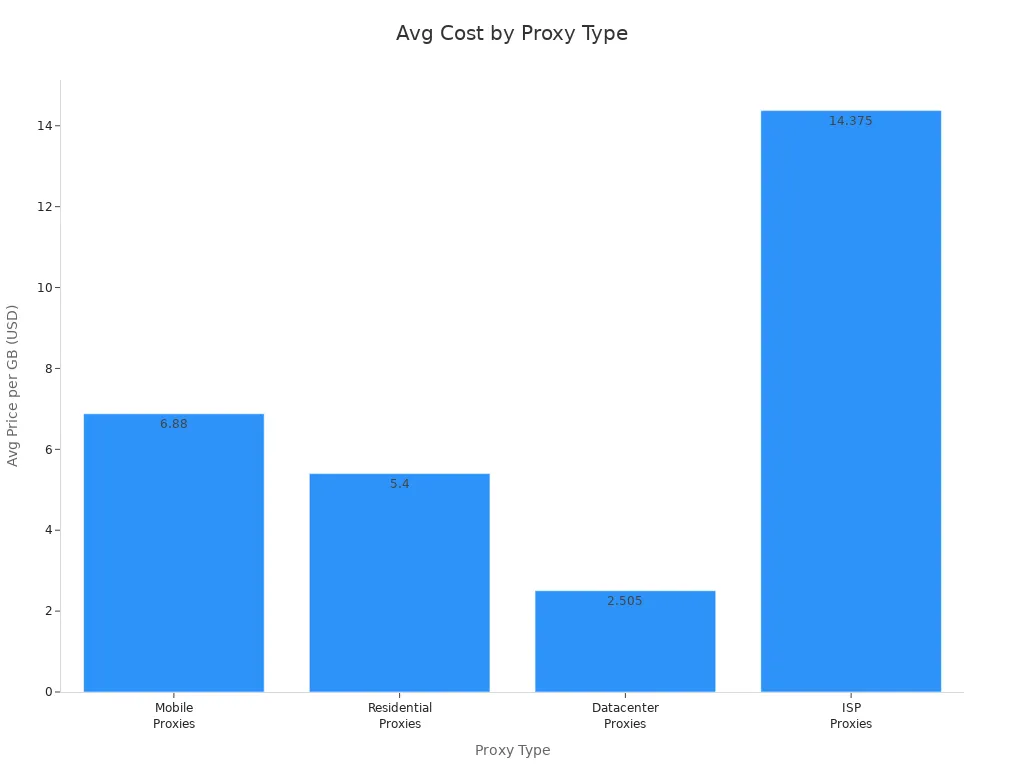
Here is a table that shows how much different proxy types cost for enterprise users:
Proxy Type | Price Range (per GB) |
|---|---|
Mobile Proxies | $3.75 – $10 |
Residential Proxies | $3.0 – $7.8 |
Datacenter Proxies | $0.51 – $4.50 |
ISP Proxies | $12.75 – $16 |
Dedicated SIM Solutions
You need dedicated sim cards for your business proxy setup. These cards give you your own mobile IP address. You get better privacy and fewer blocks. Dedicated sim cards stop you from sharing with others. Your business can run many sessions at once. You can test apps, check ads, or collect data from different places. Dedicated sim cards make your proxy network strong and steady.
Tip: Dedicated sim cards help you control your proxy pool. You can change IPs fast and keep your work safe.
Carrier Agreements
Carrier agreements give you special access to mobile networks. You can set up a proxy system with real mobile IPs. Your business gets more control and choices. Carrier agreements let you pick the locations and types of IPs you want. You can grow your proxy network as your business gets bigger. Enterprise carrier contracts make it easy to add more connections when you need them.
You can use proxy services with carrier agreements to reach new markets. Your team can test websites, apps, and ads in other countries. You get real results because your proxy uses real mobile IPs.
Technical Features of Mobile Proxies
Encryption and Security
You want your data to be safe when using a proxy. Mobile proxies use encryption to keep your information private. Encryption turns your data into a secret code. Only the right person can read this code. This stops hackers from seeing your private details. Strong encryption makes your connection even safer. You get a safe tunnel for your internet traffic. Encryption works every time you use a proxy. Your passwords, messages, and files stay hidden. Advanced encryption also helps stop spying. You can trust your proxy to keep your browsing safe. Encryption protects you every second you are online.
Authentication Methods
You must prove who you are before using a proxy. Mobile proxy platforms use different ways to check your identity. These methods help keep your connection safe. Here are some common authentication methods:
Authentication Method | Description |
|---|---|
Kerberos | Supported for user authentication in mobile proxy platforms. |
RADIUS | A widely used authentication protocol. |
SAML | Supports single sign-on capabilities. |
LDAP | Directory service protocol for user authentication. |
Client Certificates | Provides a secure method for user authentication. |
Local User Database | Allows for user authentication without external services. |
You might use a password, a special certificate, or single sign-on. Each method adds more encryption. This means only you can use the proxy. Authentication keeps strangers out. You have more control over who uses your proxy network.
Platform Compatibility
You want your proxy to work on all your devices. Mobile proxies support many systems and devices. You can use them on Windows, Mac, Linux, Android, and iOS. Some proxies work with browsers, apps, and smart TVs. You do not need special tools to use them. You just set up the proxy and start browsing. Encryption works on every device. This gives you the same protection on your phone, tablet, or computer. You can switch devices and stay safe. Mobile proxies make it easy to be secure and private wherever you go.
You get strong privacy, security, and reliability with mobile IP proxies. These proxies use real mobile operator IPs. Your requests look like normal user traffic. You get blocked and banned less than with other proxies.
Trend/Factor | Description |
|---|---|
Technological Advancements | Automation and dynamic IPs help businesses collect data and stay safe. |
Regulatory Changes | New rules make companies use better proxy services for privacy. |
Economic Shifts | More companies buy dynamic proxies as they use more digital tools. |
Pricing Dynamics | Lower prices help more people use mobile proxies. |
Cybersecurity Threats | More threats make mobile proxies important for keeping information safe. |
Try Yilu Proxy’s free trial. You can see how mobile IP proxies help you stay private and connected.
FAQ
What is a mobile IP proxy?
A mobile IP proxy lets you use the internet through a real mobile network. You get an IP address from a real SIM card. This makes your connection look like a normal phone or tablet.
How does a mobile proxy keep you private?
You use a real mobile IP, so websites see you as a regular user. Your traffic blends in with other mobile users. This makes it hard for sites to track or block you.
Can you use mobile proxies on any device?
Yes! You can set up a mobile proxy on phones, tablets, or computers. Most mobile proxies work with Windows, Mac, Linux, Android, and iOS.
Why do businesses choose mobile proxies?
Businesses use mobile proxies to test ads, collect data, and manage accounts. You get real mobile IPs, which lowers the chance of getting blocked or flagged.
Do mobile proxies help bypass geo-restrictions?
Yes. You can pick an IP from another city or country. This lets you access websites and apps that are blocked in your area.